

Best Shopify Stocky Alternative for Ecommerce Stores
Stocky is shutting down on August 31, 2026. Switch to Channel Bay, Shopify Stocky alternative with inventory sync, purchase orders, and stock control.


Stocky is Shopify's native inventory management app, included with Shopify POS Pro, that helps merchants manage inventory, purchase orders, transfers, suppliers, and stocktakes. However, with Stocky scheduled to shut down on August 31, 2026, merchants need to start evaluating their next steps. The challenge isn't simply replacing a tool, it's finding a solution that supports existing workflows without disrupting day-to-day operations.
Today, there are several inventory management platforms that offer features similar to Stocky, including inventory control, purchase orders, transfer orders, supplier management, stocktakes, and barcode scanning. These tools can help merchants centralize inventory operations and reduce reliance on manual spreadsheets and disconnected processes.
In this blog, we'll explore what merchants should look for in a Stocky replacement and how solutions such as Channel Bay can help support a smooth transition.
Key takeaways
Stocky, Shopify's free first-party inventory app, shuts down completely on August 31, 2026.
It was pulled from the Shopify App Store on February 2, 2026, so no new installs or reinstalls are possible.
Shopify is folding basic inventory features into Shopify admin, but advanced workflows, automated purchase orders, demand forecasting, and any multi-channel sync, are not fully replaced natively.
Stocky data does not migrate automatically. You must export it manually before the cutoff, and supplier records cannot be exported from Stocky at all, they have to be recreated in your new system.
Channel Bay is a Shopify Stocky alternative that matches Stocky's core features and adds multi-channel, multi-store, return-order, and sales-order tracking.
What is Shopify Stocky?
Stocky is a free, first-party inventory management app built by Shopify and included with the Shopify POS Pro subscription. It was designed to sit between Shopify's basic stock tracking and full stock control, handling purchase orders, demand forecasting, supplier tracking, stock transfers, and physical stocktakes.
Over time, Shopify moved Stocky's capabilities into Shopify admin, starting with basic stock tracking and adjustment counts, then ABC analysis and multi-location logic. Along the way, inventory transfer creation and min/max forecasting were removed from Stocky entirely. The app retires fully on August 31, 2026.
Why is Shopify Stocky shutting down?
There is no single press release naming one Stocky Shopify discontinuation reason, but Shopify's own migration documentation and the pattern of feature removals point to a clear answer: Shopify is consolidating inventory management into its core platform and no longer wants to maintain Stocky as a separate app.
Rather than running a standalone tool, Shopify is building inventory tracking, purchase order creation, transfer orders, supplier management, and forecasting directly into Shopify admin. Once those features are native, a separate first-party app becomes redundant. That consolidation is the practical Stocky Shopify discontinuation reason most merchants need to plan around.
The Stocky shutdown timeline
Shopify communicated the change in three stages. Knowing the dates matters because each one removes something you may still rely on:
Date | What happens |
July 7, 2025 | Key features removed from Stocky, including inventory transfers between locations and min/max replenishment forecasting. |
February 2, 2026 | Stocky removed from the Shopify App Store. No new installs, no reinstalls. |
August 31, 2026 | Complete shutdown. Stocky stops working and all Stocky APIs stop, so any third-party tool connected to Stocky breaks. A limited read-only access period is expected after this date, but it should not be treated as a permanent archive. |
What a good Stocky alternative needs to replace
Native Shopify admin covers the basics, but Stocky did specific operational jobs that "basic stock tracking" does not. Before choosing any Stocky alternative, confirm it handles:
Purchase orders and receiving including the suppliers and cost history behind them.
Stock transfers between locations with a real replenishment workflow.
Stocktakes multi-device or barcode counting with variance reconciliation back to Shopify.
Supplier records because these cannot be exported from Stocky and must be rebuilt somewhere.
Low-stock alerts to prevent stockouts, and accurate sync to prevent overselling.
If you only sell through a single Shopify store and need light stock tracking, Shopify's built-in tools may be enough. If you sell across more than one channel or store, or you run any depth in Stocky, you will need a dedicated Stocky inventory management Shopify replacement.
What is Channel Bay?
Channel Bay is a complete inventory management app built to replace Stocky and extend it, with accuracy as the core focus. It covers real-time inventory sync to prevent overselling, purchase order creation, stock transfers, low-stock alerts to avoid stockouts, supplier management, return-order tracking, physical stocktakes, barcode scanning, and sales-order reporting. Multiple users can work simultaneously within a single account. Channel Bay already syncs inventory for Shopify merchants across multiple sales channels, which is the gap Stocky was never designed to fill.
Channel Bay vs Stocky: Feature Comparison
Feature | Channel Bay | Stocky |
Pricing | Starting from $30 | Free |
Inventory management | Yes | Yes |
Low-stock alerts | Yes | Yes |
Multi-location | Yes | Yes |
Multi-channel | Yes | No |
Multi-store | Yes | No |
Purchase orders | Yes | Yes |
Stock transfers | Yes | Yes |
Stocktakes | Yes | Yes |
Barcode scanning | Yes | Yes |
Prevent overselling | Yes | Yes |
Prevent stockouts | Yes | Yes |
Supplier data history | Yes | Yes |
Merchant can be a vendor | Yes | Yes |
External integrations | Yes | No |
Return-order tracking | Yes | No |
Sales-order tracking | Yes | No |
Where Channel Bay goes beyond Stocky
The table shows parity on Stocky's core jobs. The difference is the work Stocky was never built to do, because it was a single-location purchasing and forecasting tool for Shopify POS:
Multi-store inventory sync. Keep stock accurate across several Shopify stores at once, something Stocky's single-location design could not do.
Multi-channel inventory sync. Sync stock across Amazon, eBay, Etsy, Walmart, and other channels. Stocky stayed inside Shopify by design.
Return-order and sales-order tracking. Track returns and sales orders directly, neither of which Stocky handled.
External integrations. Connect to outside platforms; Stocky's first-party, Shopify-only scope ruled this out.
How to Migrate from Stocky before the Cutoff
Because Stocky data does not transfer automatically, plan the move in clear steps and start early, testing on a deadline is how accuracy slips.
Export your data manually. Pull inventory records, purchase orders, stocktakes, and reports out of Stocky before August 31, 2026. After retirement you cannot get them back.
Document your suppliers separately. Supplier and vendor records cannot be exported from Stocky, so capture lead times, costs, and contact yourself before the shutdown, this is the step that catches most merchants off guard.
Choose your destination. Native Shopify admin for single-channel sellers, a dedicated app like Channel Bay for multi-channel or multi-store sellers, or a full ERP for large operations.
Run both systems in parallel. Before cutting over, run your new platform alongside Stocky to confirm purchase orders, barcode scans, and inventory adjustments map correctly back to Shopify admin.
Setting up Channel Bay
Once you choose Channel Bay as your Stocky alternative:
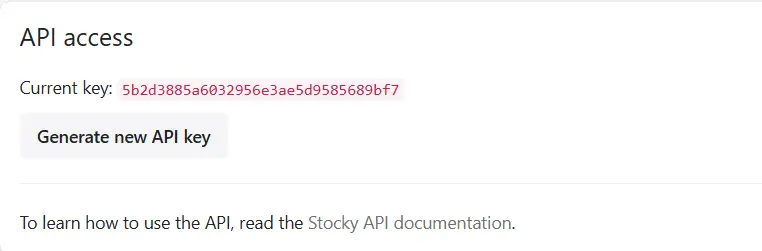
Sync Stocky - Go to Stocky Preferences and copy the API access code.
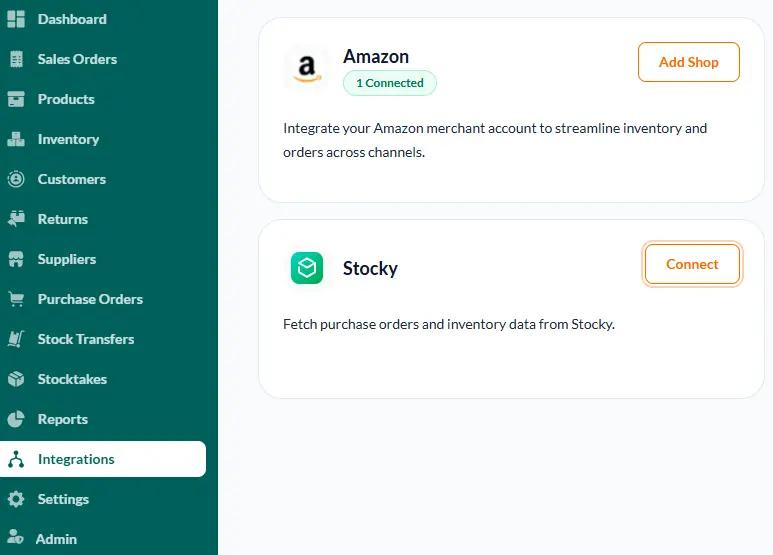
Integrate with Channel Bay - In Channel Bay, navigate to the Integrations section, find Stocky, click Connect, and paste the API access code.
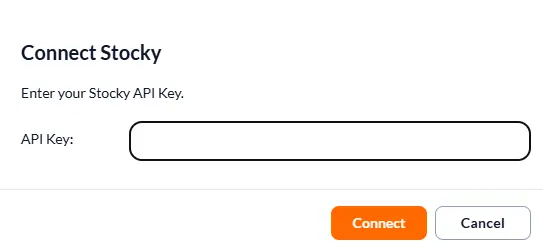
Import data into Channel Bay - Channel Bay will automatically import your suppliers and purchase order data from Stocky. Once the import is complete, review and verify all transferred data.
Test in parallel - Run a few products through purchase orders, stocktakes, and barcode scanning to ensure inventory adjustments sync correctly with Shopify before fully switching over.
Once you switch to Channel Bay, if you will update inventory in Shopify it will update your inventory instantly, but if your are multi-channel or multi-store business and making any changes in this system, it will take maximum two minutes to update all your multi-channel, multi-location or multi-store inventory.
Conclusion
Stocky's shutdown does not have to disrupt your operations. Channel Bay works as a complete Shopify Stocky alternative: it matches Stocky's core inventory, purchase order, transfer, stocktake, and supplier features, then adds the multi-channel and multi-store sync Stocky never had, plus return- and sales-order tracking, overselling protection, and stockout prevention. Migration is manual because Stocky data cannot move automatically, but planning it before August 31, 2026 keeps the transition clean.
FAQs
Is Channel Bay a complete alternative to Stocky?
Yes. Channel Bay matches Stocky's core inventory features and adds more for Shopify sellers, including multi-channel, multi-store, and multi-location management. You can integrate with external platforms, track sales and return orders, prevent overselling, and avoid stockouts.
What is the Stocky Shopify discontinuation reason?
Shopify is consolidating inventory management into its core platform, building purchase orders, transfers, supplier management, and forecasting directly into Shopify admin, which makes a separate first-party app redundant. The app retires fully on August 31, 2026.
What is the best way to migrate from Stocky?
Export your historical data before the cutoff, document your suppliers separately (Stocky cannot export supplier records), and run your new system alongside Stocky for a short period to confirm everything works before switching fully. Moving to Channel Bay lets you import your existing Stocky purchase orders so you can keep managing open POs without interruption.
Can an app handle multiple suppliers for different products?
Yes. Channel Bay supports multiple suppliers for different products, and a merchant can also act as a vendor.
Can an app support multi-channel, multi-store, and multi-location inventory sync?
Yes. Channel Bay is built for multi-channel, multi-store, and multi-location inventory sync across Shopify and channels like Amazon, shopify and more.

