Channel Bay: The Best Stocky Alternative for Shopify
Looking for an alternative before the Stocky shutdown? Channel Bay replaces every Stocky feature and adds real-time multi-channel sync with Free migration

On this page
- Stocky vs Channel Bay: A Quick Comparison
- Multi-Channel Inventory Management
- Real-Time Inventory Sync
- Multi-Location Inventory Management
- Purchase Order Creation
- Stocktakes
- Supplier and PO History
- Stock Transfers
- Low-Stock Alerts
- Demand Forecasting
- What should you look for in a Stocky alternative?
- How do I migrate from Stocky to Channel Bay?
- The Bottom Line
Key Takeaways
- Stocky shuts down completely on August 31, 2026, and was delisted from the Shopify App Store on February 2, 2026, so new installs are no longer possible.
- Channel Bay is a Shopify Stocky alternative that matches every core Stocky feature and adds real-time multi-channel inventory sync.
- Stocky requires Shopify POS Pro, while Channel Bay works across Shopify, Amazon, and other sales channels.
- Export your Stocky data before August 31, 2026. Channel Bay provides free migration to move it across for you.
The best Stocky alternative is one that keeps the workflows you already rely on and fixes the gaps Stocky left behind. Shopify is discontinuing Stocky on August 31, 2026, and any data you have not exported will be lost after that date. Channel Bay is a Shopify Stocky replacement that rebuilds every core Stocky feature, purchase orders, stocktakes, stock transfers, supplier history, and demand forecasting, then adds real-time multi-channel inventory sync that Stocky never offered. Migration is free and our team handles the heavy lifting for you.
If you are searching for a Stocky alternative, this guide compares Stocky and Channel Bay feature by feature so you can see exactly where they match and where Channel Bay goes further. We also verified the sunset details against Shopify's announcement, since the timeline changes what your migration actually looks like.
Stocky vs Channel Bay: A Quick Comparison
Before the section-by-section breakdown, here is how Stocky and Channel Bay compare on pricing, features, and workflows at a glance. The short version: Channel Bay covers what Stocky did, and covers multi-channel selling that Stocky never handled.
| Feature | Stocky | Channel Bay |
|---|---|---|
| Pricing | Requires Shopify POS Pro | Starting at $30 |
| Multi-channel stock management | No | Yes |
| Real-time inventory sync | No | Yes |
| Multi-location inventory | Yes | Yes |
| Purchase order creation | Yes | Yes |
| Stocktakes | Yes | Yes |
| Supplier and PO history | Yes | Yes |
| Stock transfers | Yes | Yes |
| Low-stock alerts | Yes (scheduled email) | Yes (instant) |
| Demand forecasting | Yes | Yes |
| Availability after Aug 31, 2026 | Discontinued | Active |
Some Stocky features were already scaled back ahead of the full shutdown. Transfer creation and management moved into Shopify Admin, and historical transfers were only kept inside Stocky until June 30, 2025. So parts of the workflow have been degrading for a while, not just after the sunset date.
Multi-Channel Inventory Management
Stocky was built for the Shopify ecosystem and never offered true multi-channel inventory management, which is one of the biggest reasons merchants look for a Stocky alternative. Channel Bay is built for exactly this: it syncs inventory across Shopify, Amazon, and more from one dashboard.
As your store grows, you usually expand beyond Shopify onto marketplaces like Amazon, Etsy, Walmart, and WooCommerce. That opens up sales, but it also makes inventory harder to control. Without a centralized system you run into overselling, stockouts, duplicate data entry, and inaccurate counts.
How Stocky Handled It
Stocky focused on Shopify inventory data and did not provide multi-channel management. Merchants selling on outside marketplaces had to bolt on separate inventory software to keep counts synced across channels. With Stocky sunsetting, that dependency only grows.
How Channel Bay Handles It
Channel Bay connects and syncs inventory across every supported sales channel and pulls it into a single dashboard. From one place you can watch stock levels, spot which channels need replenishment, and keep counts accurate across the whole business. That is the core reason merchants pick Channel Bay as a Shopify Stocky alternative rather than a like-for-like clone.
Real-Time Inventory Sync
Stocky relied on scheduled background syncs with Shopify Admin, so changes on other channels were not reflected right away. Channel Bay syncs in near real time, usually within two minutes, and often within seconds for low-volume updates.
Real-time sync matters most when you sell across several channels or locations. It updates quantities the moment a sale happens, so every connected channel shows current stock. That is what prevents overselling and cuts down stockouts.
A quick example
Say you sell T-shirts on both Shopify and Amazon, with 20 in stock. You sell 10 on Shopify, then 9 more on Amazon within two minutes. Without real-time sync, Shopify might still show 20 and Amazon might show 11, because neither platform knows about the other channel's sale. You have actually sold 19 and have 1 left. A synced system closes that gap automatically so both channels show the correct count.
How Channel Bay Handles It
Once you connect your channels, Channel Bay keeps inventory synced across all of them continuously. Instead of waiting 10 to 15 minutes for an update, changes land in about two minutes, with small updates in seconds. You hold accurate stock levels, oversell less, and get real inventory visibility across the business.
Multi-Location Inventory Management
Multi-location inventory management means tracking stock across retail stores, regional warehouses, fulfillment centers, and third-party logistics providers. Stocky handled multiple Shopify locations. Channel Bay handles Shopify locations plus outside sales channels from the same dashboard.
How Stocky Handled It
Stocky lets Shopify POS Pro merchants manage inventory across multiple Shopify locations. You could create purchase orders, transfer stock between locations, and use demand forecasting to make better decisions across stores and warehouses. It just stopped at the edge of the Shopify ecosystem.
How Channel Bay Handles It
Channel Bay extends this beyond Shopify. From one dashboard you can create stock transfers, manage purchase orders, and keep counts accurate across warehouses, retail stores, and connected channels, whether or not those channels are Shopify.
Purchase Order Creation
Both let you create and send purchase orders, but Stocky's version disappears on August 31, 2026. A purchase order is a binding document you issue to a supplier listing the products, quantities, variants, delivery location, payment terms, and any notes. It commits the buyer to buy and the supplier to supply at set terms, which is how you head off stockouts and keep ordering predictable.
How Stocky Handled It
In Stocky you could create, edit, and send purchase orders to vendors and track partial or multi-location receipts. After August 31, 2026, that goes away, and you will not be able to manage purchase orders in Stocky at all.
How Channel Bay Handles It
Channel Bay lets you create a purchase order, send it to the supplier, edit it whenever you need, and receive it against stock without friction. When receiving, you can scan each item's barcode so the count is fast and accurate.
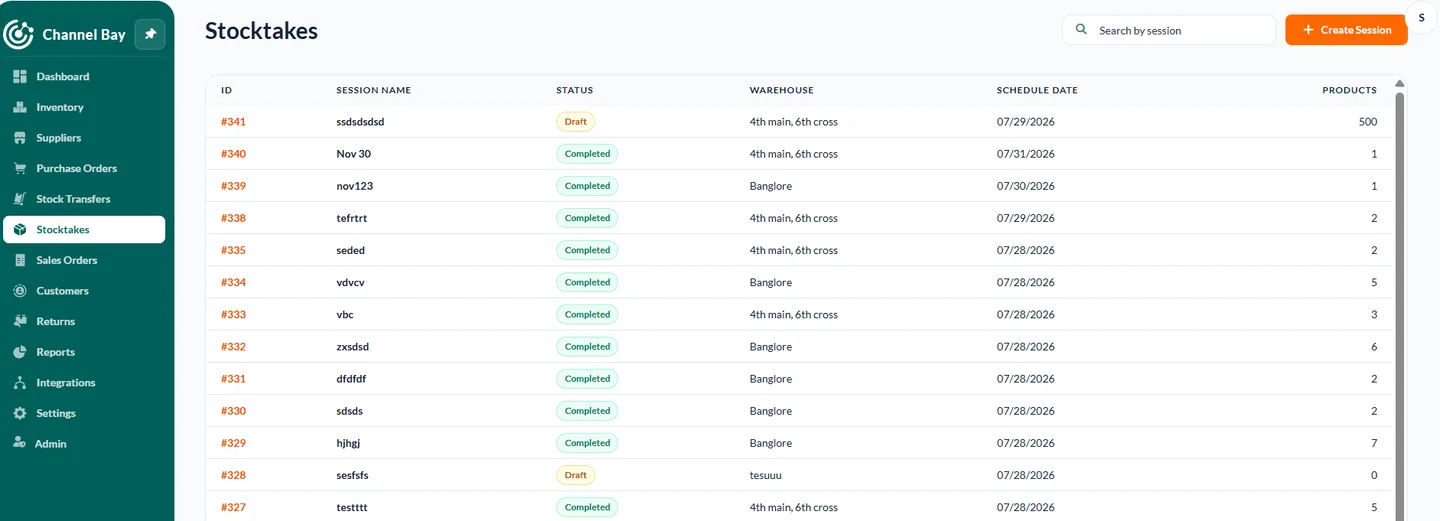
Stocktakes
A stocktake is where you count physical inventory and check it against your digital counts to catch mismatches, theft, or shrinkage. Done regularly, it prevents discrepancies, avoids stockouts, and keeps purchasing accurate. Both Stocky and Channel Bay support stocktakes, with a different workflow.
How Stocky Handled It
Stocky lets you create a new stocktake and count each on-hand item, flagging missing, lost, or extra units so you know exactly where mismatches happened. That is how it kept inventory discrepancies under control.
How Channel Bay Handles It
In Channel Bay you create a session, name it or schedule it, and the system runs the inventory count and reports the results back to you. You get the same discrepancy control with less manual setup.
Supplier and PO History
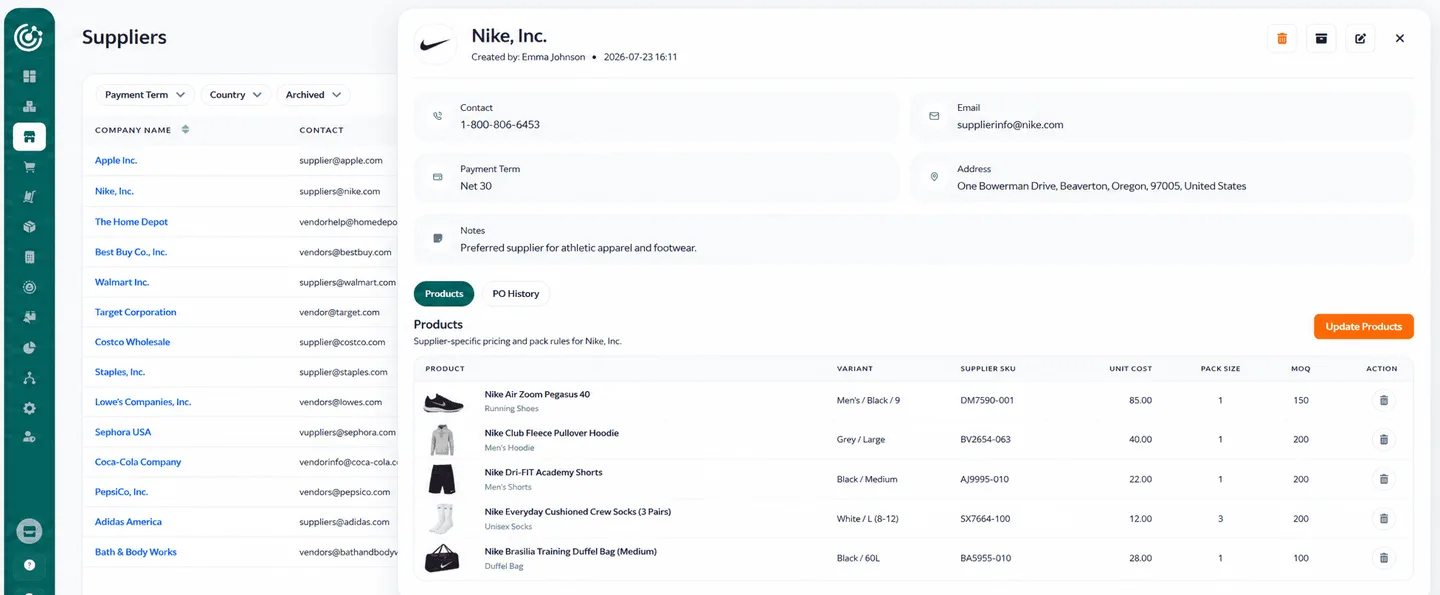
Keeping supplier and PO history in one place saves real work: you can see which purchase order went to which supplier, the date, the cost, and how much you paid per unit, so your next order is more accurate. Both tools store this history.
How Stocky Handled It
Stocky stored supplier history, including transactions, pricing, and fulfillment history for each vendor, so you had a running record per supplier.
How Channel Bay Handles It
In Channel Bay, adding a supplier or creating a purchase order records the history automatically. You can look up the supplier, the PO, the transactions, how much you spent, the quantity, and which items you ordered, all in one view.
Stock Transfers
Stock transfers let you restock one location from another without raising a new purchase order. If warehouse A has 5 units left and warehouse B has 200, you move some stock from B to A and restock without buying more. Both Stocky and Channel Bay support transfers, but Stocky's had a sync gap.
How Stocky Handled It
Stocky lets you transfer inventory between store locations by choosing the source, the destination, and the products, marking it in transit to lower the source count, then clicking receive on arrival to update the destination. The catch: Stocky did not sync outside channels like Amazon, so if the same warehouse fed several channels, counts could drift and transfers relied on manual counting.
How Channel Bay Handles It
Because Channel Bay syncs multi-channel and multi-store inventory, counts update in real time after each deduction. So when a warehouse needs restocking, you can see it clearly and decide which location is the source and which is the destination, without the manual reconciliation Stocky needed.
Low-Stock Alerts
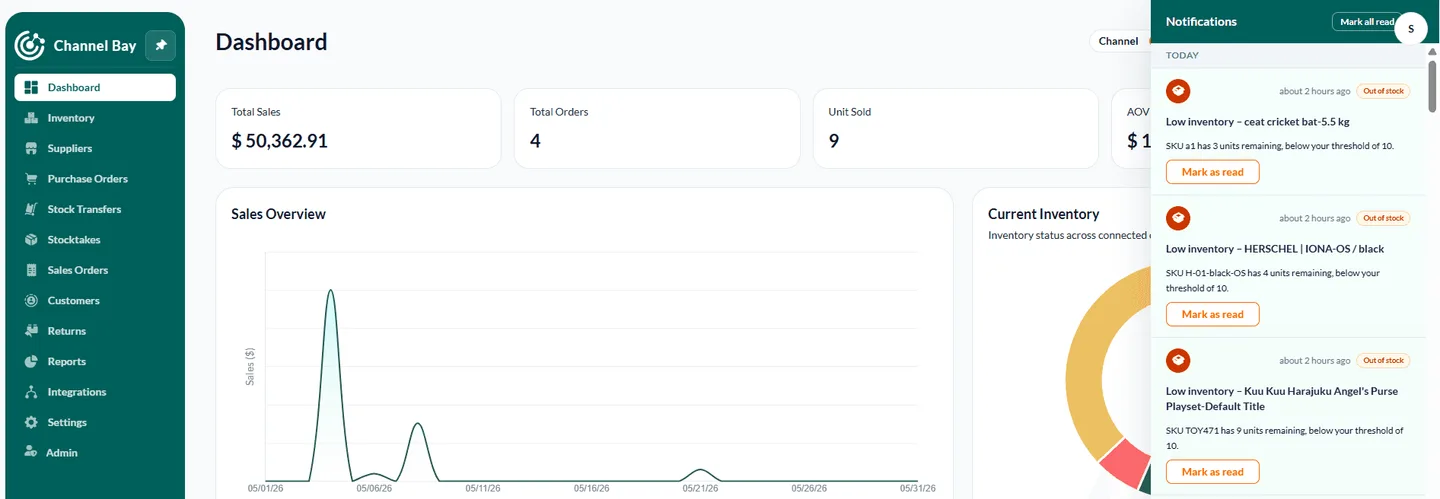
Low-stock alerts are one place Channel Bay clearly pulls ahead of Stocky. They need two things to work well: real-time inventory updates and all your channels and stores synced to the system. You set a threshold per item, and when stock drops below it, you get an alert to restock, so you are not checking inventory by hand.
How Stocky Handled It
Stocky sent low-stock alerts through scheduled email reports, not instant notifications. That helped you monitor stock, but alerts did not fire the moment an item hit its threshold, which is a problem if you need real-time visibility.
How Channel Bay Handles It
Channel Bay sends instant low-stock alerts with the exact restock quantity you need. There's no need to wait for scheduled email alerts or manually check your inventory for low-stock items.
Demand Forecasting
Both Stocky and Channel Bay forecast demand at a similar level. Demand forecasting uses historical sales, market trends, and seasonal patterns to estimate future demand for an item. It tells you how long current stock will last, when to place the next purchase order, and how many units to reorder.
How Stocky Handled It
Stocky estimated future demand using historical sales and min/max inventory levels, helping you reorder the right amount at the right time and avoid both stockouts and overstocking. It was solid, basic to intermediate forecasting.
How Channel Bay Handles It
Channel Bay's demand forecasting ties into purchase orders and multi-location inventory. You can see supplier lead times, days of inventory left, sell-through rate, and sales velocity per variant, so reorder decisions are grounded in useful signals as you plan replenishment.
What Should You Look for in a Stocky Alternative?
A good Stocky alternative should replicate Stocky's familiar workflows and close the gaps it left behind, mainly real-time sync and multi-channel support. Stocky was a trusted tool for purchase orders, stocktakes, transfers, and forecasting, so any replacement needs those as a baseline, then more. Channel Bay covers all four things below.
Purchase order management. Create purchase orders in bulk or import them by CSV, and scan barcodes when receiving so stock lands quickly and accurately.
Instant low-stock alerts. Real-time alerts across every connected channel, so you know the moment stock runs low and can replenish before a stockout.
Multi-channel, store, and location management. One dashboard that centralizes inventory as you expand to more channels, stores, and warehouses.
Real-time inventory sync. Automatic syncing across channels and locations on every sale, return, or adjustment, so counts stay accurate and overselling drops.
How Do I Migrate From Stocky to Channel Bay?
Export your Stocky data first, then install Channel Bay and let our team import it for you. Because Stocky was delisted on February 2, 2026, and its APIs stop working after the August 2026 shutdown, the safe order is to get your data out of Stocky while it still runs, then bring it into Channel Bay. Migration is free and our team handles it with you.
Step 1: Export Your Data From Stocky
While Stocky is still active, export everything you will need:
Inventory counts: current stock levels for every location.
Product variants: SKUs, barcodes, and IDs.
Supplier lists: names, contact details, and lead times.
Purchase orders: open and past order history.
Cost of goods sold: historical cost data.
Do this well before August 31, 2026. After that date any data you have not exported is lost.
Step 2: Install Channel Bay and Integrate Your Channels
1. Install the Channel Bay app from the Shopify App Store.
2. Create your profile and open the Integrations feature.
3. Connect and sync your sales channels first, then import your exported Stocky data.
4. Grant the API permissions Channel Bay needs so it can bring your records across.
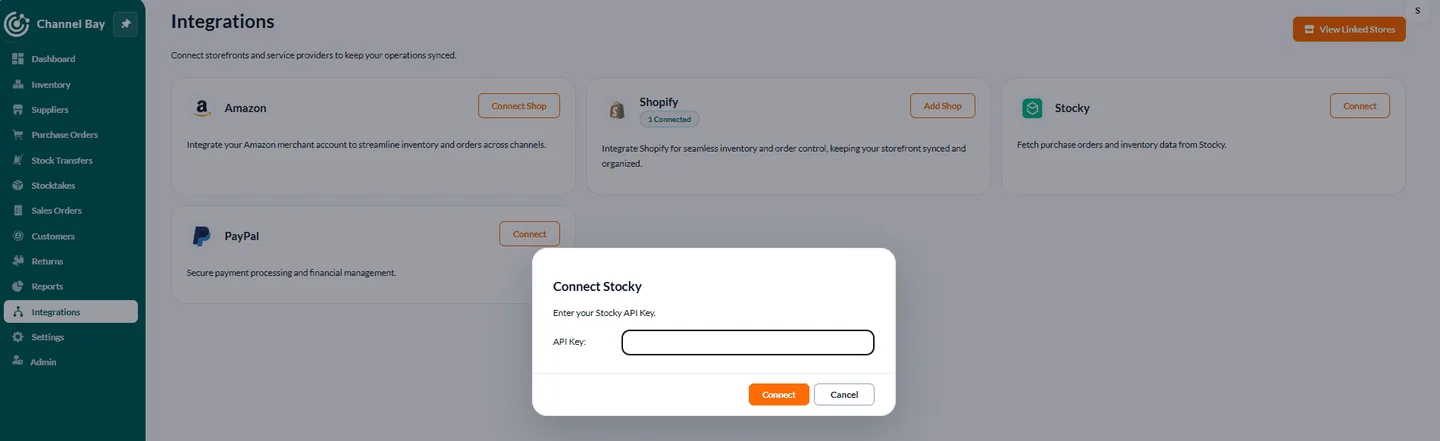
Channel Bay then populates its dashboard, where you see inventory in real time. For anything else, our team is there to help you move off Stocky without disruption.
The Bottom Line
With Stocky reaching end of life on August 31, 2026, merchants need an inventory system that keeps the familiar workflows and handles modern, multi-channel selling. Channel Bay delivers the essential Stocky features and adds real-time sync, multi-channel support, and advanced inventory controls, which makes it a reliable Shopify Stocky replacement for a growing business. Export your Stocky data early, and let our team handle the migration for free.
Frequently Asked Questions
What is the best Stocky alternative for Shopify?
Is Channel Bay different from Stocky?
Can I move my Stocky data to Channel Bay?
What does Channel Bay do that Stocky could not?

Guides from the team that builds and supports Channel Bay, the Shopify inventory app for purchase orders, stocktakes, stock transfers and multichannel stock sync. About Channel Bay