

Shopify Stocky API, Migration and Replacement: All You Need to Know
What Shopify's Stocky API exposed, what your migration could and couldn't bring across, and what to look for in a Stocky replacement. From building an importer.

Shopify's Stocky API stopped working on 31 August 2026, except for a subset of stores whose access runs to March 2027. It only ever exposed three resources: purchase orders (POs), suppliers and tax types.
A migration through the API brings across your supplier records and your PO history with line items. It cannot bring across suppliers to product links, PO status, received quantities or cost history, because the API never exposed them. The manual export that replaced the API for most stores carries even less.
We built Channel Bay's Stocky importer against that API, and nobody ever wrote down what it did and didn't expose. This is that write up. It covers what the API gave, what any API based migration was missing, and what those gaps should decide when you choose a replacement.
Key takeaways
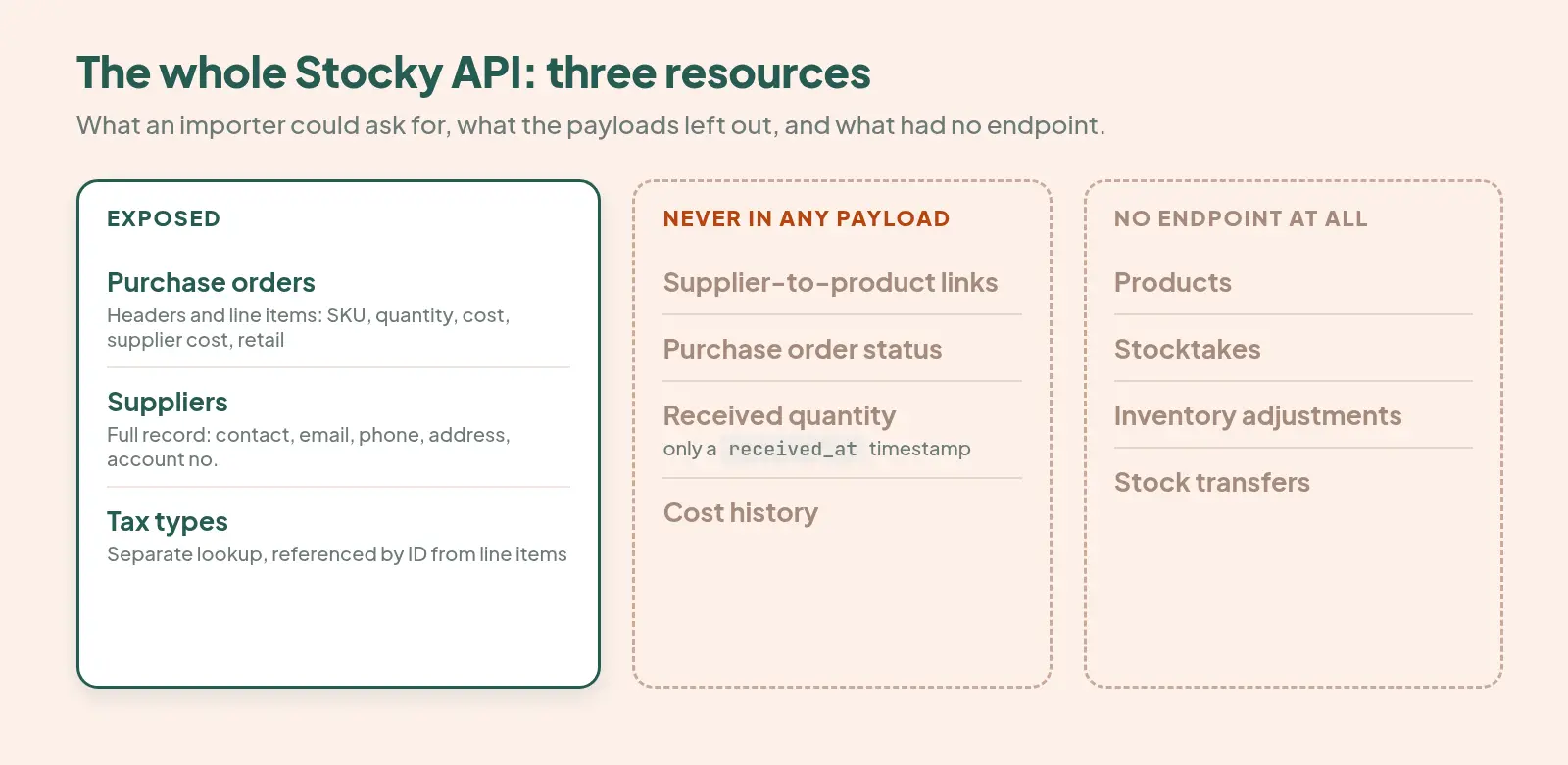
Stocky's API exposed three resources: POs, suppliers and tax types. Products, stocktakes, adjustments and transfers had no endpoint.
Suppliers came across in full through the API, but Shopify says "suppliers can't be exported from Stocky" through the manual export. Same records, different route, opposite result.
The API never exposed suppliers to product links, PO status or received quantities. Those are data gaps, not importer bugs.
A partially received PO migrates looking fully received. If your numbers look too high after a migration, this is why.
The right Stocky replacement is the one that handles the gaps that affect your catalog, not the one with the longest feature list.
What Shopify's Stocky API exposed
The whole API was three resources. If you assumed your migration would bring across your counting history or your adjustment log, the reason it didn't is simple: there was never a way to ask for them. "Stocky didn't migrate” often gets read as a decision by whoever built your importer. For most of these gaps, there was no decision involved.
Stocky suppliers: complete through the API
The supplier payload was generous. It included name, company name, account number, contact name, contact email, phone, toll free phone, fax, both address lines, city, province, postal code and country. That's your whole supplier book, intact.
Stocky purchase orders and line items
PO headers carried:
Number and
sequential_idInvoice number
Supplier and currency
Paid and archived flags
Ordered, expected, ship, invoice and payment due dates
Shipping and adjustments
Line items carried SKU, product and variant title, quantity, cost price, supplier cost price, retail price, tax type and account code.
One detail matters if you're reconciling. Alongside the PO number, Stocky returned a separate sequential_id. That's two different notions of "which order is this", and they don't always agree. The PO number is what merchants recognize, so that's what gets shown. If your migrated orders don't match your own records, the second identifier is usually the explanation.
Stocky tax types
Tax types were their own lookup, separate from the orders that referenced them. A line item pointed at a tax type by ID rather than carrying the rate itself. If you pull the orders without the lookup, your costs will be right but your tax treatment will be meaningless. It's a small thing that goes wrong quietly, which is the worst way for things to go wrong.
Stocky API vs manual export: what each route carries
Most stores no longer have API access, so the manual export is their only route. It's a much narrower door.
Data | Via the API | In the manual export | Re-importable into Shopify |
Supplier records | Yes, complete | No | No |
PO headers | Yes | Yes | No |
PO line items with cost and retail price | Yes | Yes | Into a new draft PO only |
Tax types | Yes, as a separate lookup | Not applicable | Not applicable |
Supplier-to-product links | Never exposed | No | No |
PO status | Never exposed | No | No |
Received quantity | Never exposed (only received or not) | No | No |
Cost history | Never exposed | No | No |
Stocktakes, adjustments, transfers | No endpoint | Stocky's own reports only | No |
Shopify is explicit about the re-import side: "Historical purchase orders can't be imported into Shopify." Native CSV upload for POs "only adds product line items to a new draft purchase order. It can't import past purchase order statuses, received quantities, or supplier links."
The manual export preserves a record, but it doesn't rebuild a purchasing setup. That's the strongest argument for migrating through the API if your store still has access.
What a Stocky migration can't bring across
The gaps below were never in the API. No API based importer could recover them, whichever tool you used.
Supplier to product links
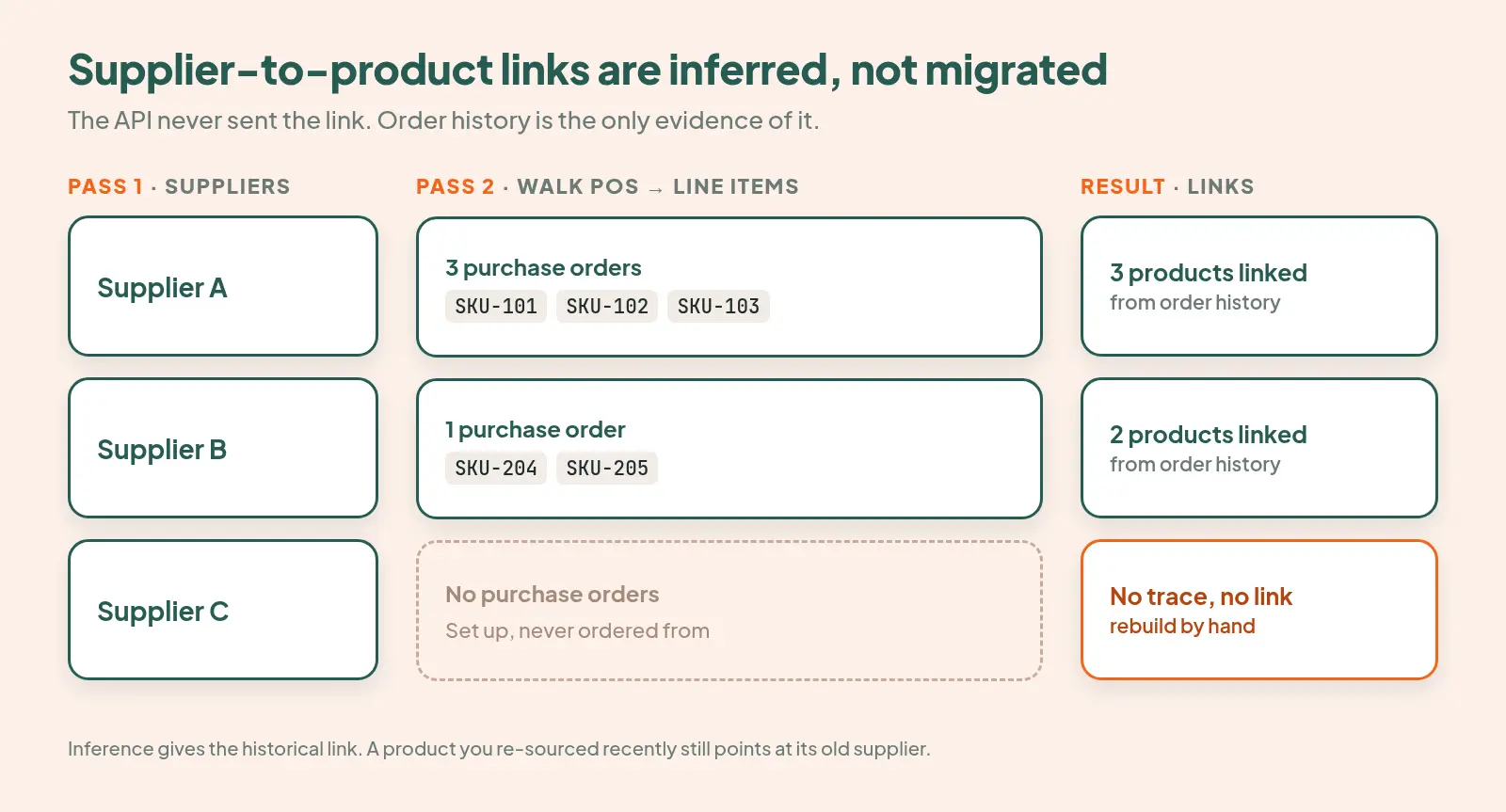
This is the biggest hole and the one that costs the most time. Stocky's API never exposed which products belonged to which supplier, at product or variant level. That association is what makes a PO fast to raise. Without it, you search your whole catalog every time instead of seeing the forty things you buy from that vendor.
The only way to recover the links is to infer them from purchase history. We do this in two passes: first we mirror the suppliers, then we walk the historical POs through to line items to rebuild the links from what you actually ordered from whom.
Inference has two hard limits:
Suppliers you never ordered from leave no trace. You'll have to link them by hand.
You get the historical link, not the current one. If you recently switched suppliers on a product, inference points to the old supplier.
Purchase order status
The API had no order level status field: no open, partially received, closed or cancelled. So every PO that migrates arrives marked Imported and read only. In our code that status is hardcoded, because there's no upstream value to read, and inventing one would be worse than admitting the gap.
This means you can't close an imported PO, because the system can't verify it was ever open. To act on one, you copy it into a new editable PO first.
Received quantities
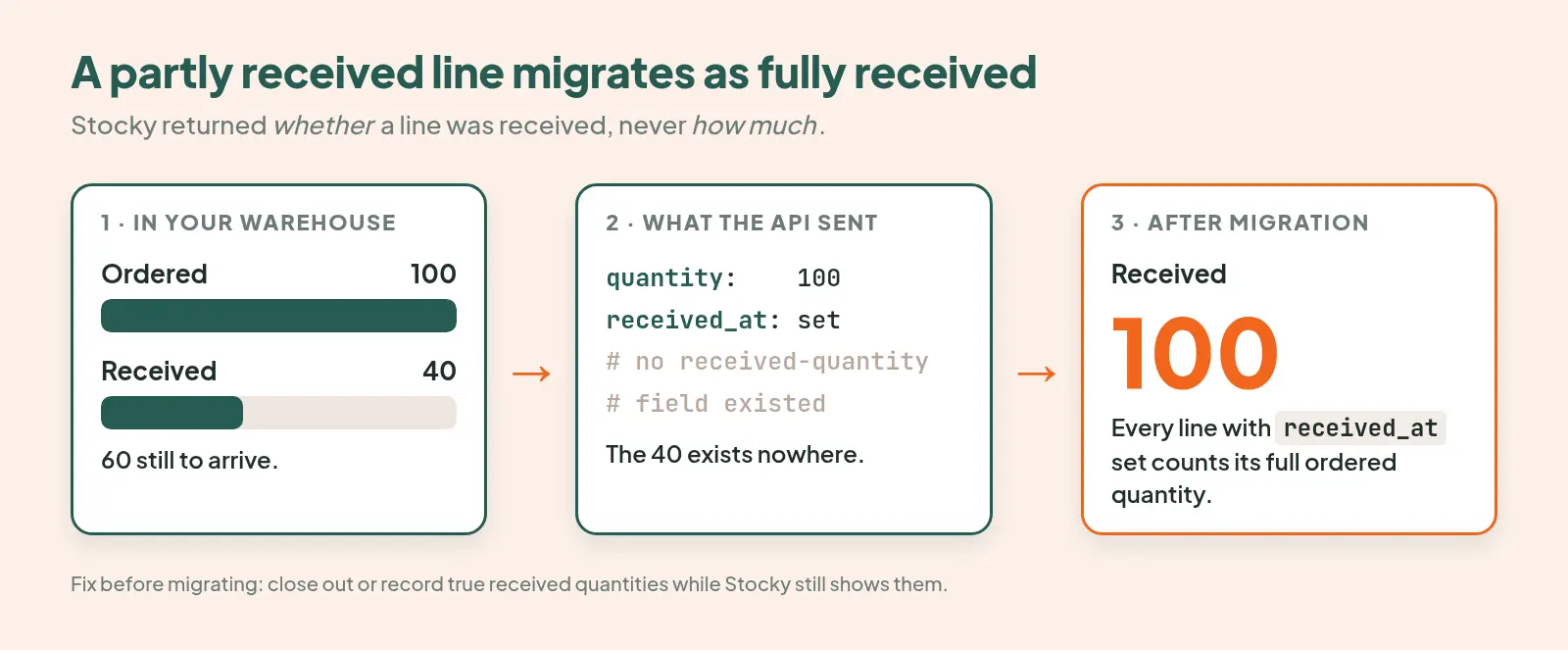
This gap produces most of the support tickets. Line items carried a received_at timestamp, but no received quantity. The API could tell you a line had been received, but not how much of it.
Say you ordered 100 units and received 40. The payload says the line was received and reports the ordered quantity of 100. The 40 exists nowhere.
Any importer can only count the full ordered quantity or discard the information. We count the full quantity, so a partially received PO migrates looking fully received. If your received numbers look too high after a migration, this is almost certainly why.
Cost history
You couldn't ask Stocky what a product cost you in March. There was no cost ledger. Each PO line does carry a cost price and a supplier cost price, though, so every PO line is effectively a dated cost point. You can rebuild landed cost and margin history across the migration from those POs, but not from anything more precise.
How Stocky PO numbers are handled after migration
Some merchants prefix PO numbers, often with a location reference, as in <location>-<sequence>. The API returned the number but never described its structure. The meaning of each part lived in the merchant's head.
The real risk isn't losing the prefix. It's imported numbers colliding with your live numbering sequence. So imported POs are held outside the automatic sequence, alongside hand typed numbers, and the sequence steps past them. Your ongoing numbering stays gapless and consecutive even with imported numbers in the same list.
Stocky migration checklist
Each step maps to one of the gaps above. The whole list takes about an hour, and it saves you the reconciliation afterwards.
Count your partially received POs. Every one will migrate looking fully received. Resolve them in Stocky before migrating, by receiving the remaining units or cancelling the unreceived lines, whichever matches reality. If there are too many to resolve, export a record of the true received quantities now. That number can't be recovered later.
List the suppliers you've never raised a PO against. Their product links can't be inferred, so you'll be rebuilding them by hand. It's better to know the count before you start.
List anything you've re-sourced in the last year. Inference gives you the historical supplier, not the current one.
Write down what your PO numbering means. If there's a prefix, record what each part signifies. No payload carries that meaning.
Spot check tax treatment after migrating. Tax types come across as references. Confirm they resolved correctly on a handful of POs.
Export everything that isn't a PO or a supplier. Stocktakes, adjustments and transfers only exist in Stocky's own reports, and only while you can still run them. Rebuilding those processes is its own job. Our guides to stocktakes in Shopify and Shopify inventory transfers cover it.
Choosing a Stocky replacement: what the gaps should decide
The useful question isn't which tool has the longest feature list. It's which of these gaps affect your catalog, and how each replacement handles them. Ask these questions of any vendor:
Does it infer supplier to product links from PO history?
Or will you be mapping products to suppliers one at a time?How does it treat imported POs?
A tool that marks them open or closed is guessing. Ask what it does with an order whose status was never exposed.Where does its receiving history come from?
Some tools advertise complete receiving history. The API never carried received quantities, so ask which source they read: Stocky's reports, your exports, or the API.Can it import supplier contact details in bulk?
Shopify's own API returns only supplier names, so contact details have to come from somewhere else.Does it cover what Stocky did outside the API?
That means stocktakes, transfers and adjustments. These are processes you're rebuilding, not data you're migrating.Does it keep weighted average or historical cost?
If you have real accounting rigour, this matters.
For a broader comparison of features and pricing, see our guide to choosing a Shopify purchase order app.
Here's how Channel Bay answers those questions:
Supplier links are inferred from PO history and handed back pre linked.
Supplier contact details bulk import from a file.
Products, costs and stocktakes imported by CSV.
Imported POs stay read-only and get copied when you need to act on one.
We don't yet do perpetual weighted average cost or point in time historical cost. Both are on our backlog, and the merchants who've asked for them are right to.
If your Stocky still answers, we run the migration for you free, and we'll tell you which of these gaps apply to your store before we start.
Frequently asked questions
Why do my migrated Stocky purchase orders show as fully received?
Stocky's API only recorded whether a line was received, not how many units arrived. Importers count the full ordered quantity for any line marked received, so partially received POs arrive looking complete. Resolve partial POs in Stocky before migrating, or export the true received quantities while you still can.
Can I export suppliers from Stocky?
Not through the manual export: Shopify states that suppliers can't be exported from Stocky. Stores that still have API access can migrate complete supplier records, including contacts, addresses and account numbers, through an API-based importer.
Why can't I close an imported Stocky purchase order?
Stocky's API never exposes PO status, so imported orders arrive read only with an Imported status. There's no verified open state to close. Copy the order into a new editable PO to act on it.
Do Stocky stocktakes and transfers migrate?
No. Stocky's API had no endpoint for stocktakes, adjustments or transfers. The only way to keep that history is to export it from Stocky's own reports while you still have access, then import it into your replacement.
What should I look for in a Stocky replacement?
Start with the gaps that affect your catalog: supplier-to-product link inference, how imported POs are handled, where receiving history comes from, and stocktake and transfer support. A tool that handles your specific gaps well is worth more than one with more features.

