What Is a PO Number? Format, Examples and How to Assign One
A PO number is the unique reference you give each purchase order. Where to find one, PO number formats with examples, and a numbering scheme that scales.
On this page
- What is a PO number?
- Where to find a PO number on an invoice or packing slip
- PO number format: examples and how to choose one
- How to assign PO numbers step by step
- Rules that keep a PO number sequence clean
- Moving your PO numbers off Stocky or a spreadsheet
- When a customer sends you their PO number
- How Channel Bay numbers purchase orders
Key Takeaways
- A PO number is the unique reference a buyer gives each purchase order. The buyer assigns it, and the supplier quotes it on the order confirmation, packing slip and invoice.
- On an invoice or packing slip, look near the top for a field labeled PO number, PO #, Your order or Customer reference. It's different from the invoice number and the supplier's own order number.
- Any format works if every number is unique and comes from one counter. A prefix, the year and a zero-padded counter, such as PO-2026-0142, is easy to read and sorts in order.
- Never reuse a number. Cancel a PO instead of deleting it, keep the same number when you amend a PO, and receive split deliveries and backorders against the original PO.
- When you move off Stocky or a spreadsheet, bring the old numbers over exactly as they were and start the new sequence after the last one you used.
A PO number (purchase order number) is the unique reference a buyer gives each purchase order, such as PO-2026-0142. You assign it when you create the order. The supplier then quotes it on the order confirmation, the packing slip and the invoice, and you quote it on the goods receipt and the payment. One number links every document about one order, so anyone can trace a payment back to what was ordered.
Most explanations of what a PO number is stop at that definition. This guide goes on to where to find a PO number on an invoice or packing slip, the common formats and their trade-offs, how to assign them step by step, and a numbering scheme that still works when you buy from several suppliers, for several stores, and move off Stocky or a spreadsheet. It uses the same example as our guide to what a purchase order is and how it works: a kitchenware brand orders 500 white mugs on PO-2026-0142.
What Is a PO Number?
A PO number is the identifier that makes each purchase order unique. Two orders to the same supplier for the same mugs can look identical line by line. Their PO numbers are what tell them apart, in your records and in the supplier's.
The buyer assigns the PO number, not the supplier. The supplier has its own numbers, for its sales order, its packing slip and its invoice, and it adds your PO number to each of them as a reference. That's why one order collects several numbers along the way. On PO-2026-0142, the PO number turns up on six documents:
| Document | Created by | What the PO number does there | On PO-2026-0142 |
|---|---|---|---|
| Purchase order | You | Identifies the order | PO-2026-0142, sent 16 October |
| Order confirmation | Supplier | Shows which order the supplier accepted | The supplier's order number, quoting PO-2026-0142 |
| Packing slip | Supplier | Tells your receiving team which order a delivery belongs to | Packed in the cartons, quoting PO-2026-0142 |
| Invoice | Supplier | Ties the bill to the order, so it can be matched before you pay | INV-3318 for $1,780 on 3 November, quoting PO-2026-0142 |
| Goods receipt | You | Records what arrived against the order | GRN-0457 on 10 November: 480 of 500 mugs accepted |
| Payment | You | Tells the supplier which order and invoice you're paying | $1,716 on 3 December, referencing PO-2026-0142, INV-3318 and credit note CN-0291 |
Without the PO number on each of these, someone has to work out from dates, quantities and amounts which order a delivery or a bill belongs to. With one supplier and one order a month, that's a nuisance. With ten suppliers and several open orders each, it's how invoices get paid twice and deliveries get received against the wrong order.
Where to Find a PO Number on an Invoice or Packing Slip
Look near the top of the document, close to the invoice number and date, or in a reference box beside the addresses. Suppliers label it in different ways:
- PO number, PO #, PO No.
- Purchase order number
- Your order, Your order number, Your ref
- Customer PO, Customer reference, Buyer's reference
On a packing slip it's usually in the header, and some suppliers also print it on carton labels so a delivery can be booked in before anyone opens a box. On a supplier invoice it sits beside the invoice number, and sometimes again on each line when one invoice bills several orders.
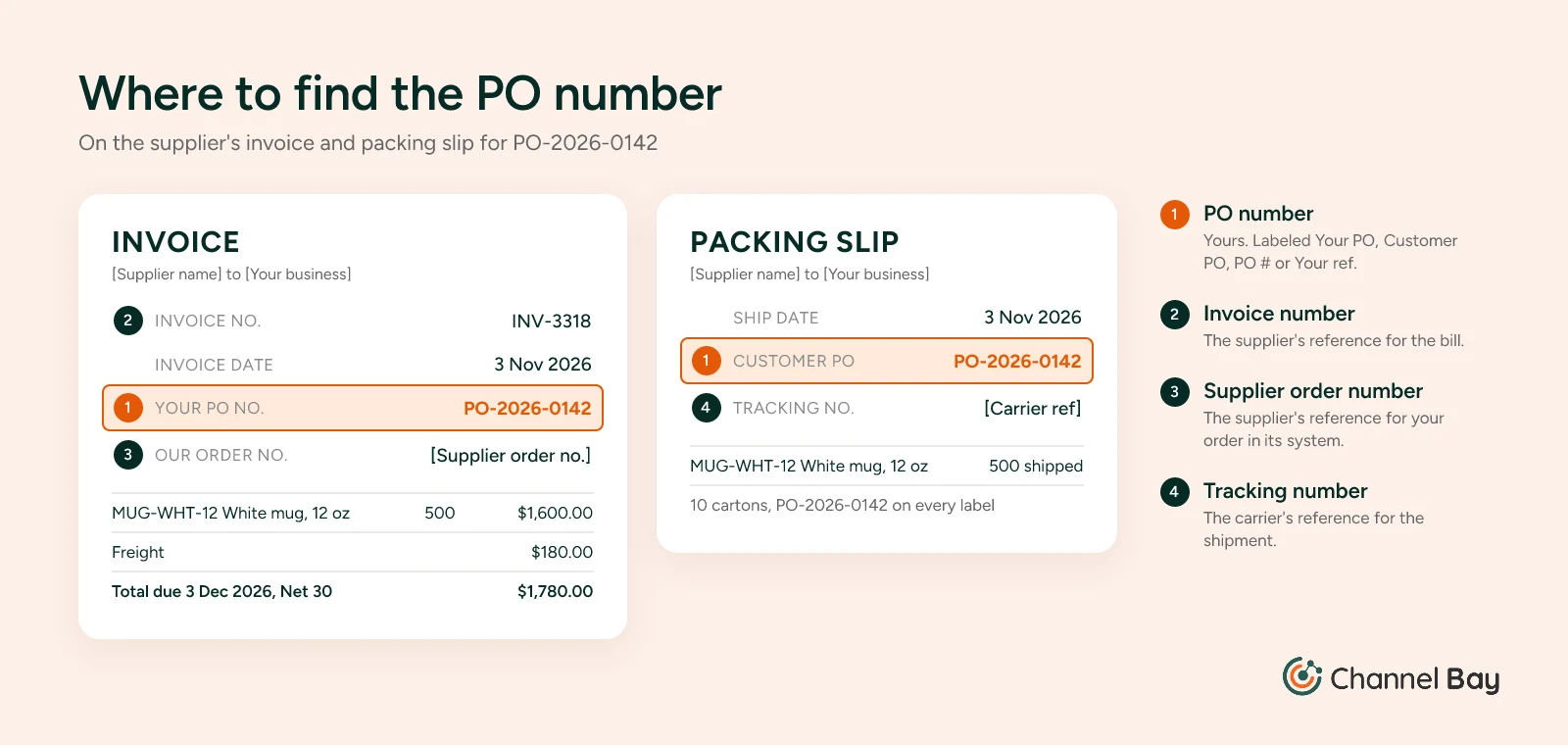
The PO number is easy to confuse with three other numbers on the same page:
| Number | Whose it is | Example on PO-2026-0142 |
|---|---|---|
| PO number | Yours, the buyer's | PO-2026-0142 |
| Invoice number | The supplier's reference for the bill | INV-3318 |
| Sales order or order number | The supplier's reference for your order in its own system | Whatever the supplier's system assigns |
| Tracking or waybill number | The carrier's reference for the shipment | Set by the carrier |
If you can't find a PO number on a supplier's document, it isn't there, and that's worth fixing rather than working around. Find the order in your own records by supplier, date and items, and ask the supplier to reissue the invoice with the PO number on it. Then put "Quote our PO number on all documents" in your PO terms, so the next one arrives with it. The check before you pay is in our guide to purchase order vs invoice.
If you're the seller, the PO number you're looking for is on the purchase order your customer sent you. More on that at the end of this guide.
PO Number Format: Examples and How to Choose One
There's no required format for a PO number. A business can use any format as long as two rules hold: every number is unique, and every number comes from one counter, so you can see the next one and spot a gap. Within that, the format is about what you want the number to tell you at a glance.
These are the common formats, from simplest to most structured:
| Format | Example | Good for | Watch out for |
|---|---|---|---|
| Plain sequence | 1042 | One person ordering from a few suppliers | Looks like any other number. Suppliers' invoice and order numbers can be 1042 too |
| Prefix and sequence | PO-1042 | Most small businesses | Nothing much. Pick a starting number high enough that new suppliers don't see you as a first-time buyer |
| Year prefix | PO-2026-0142 | Telling at a glance how old an order is | The counter usually restarts each year. Pad it to four digits so numbers sort in order |
| Location prefix | LON-PO-2026-0215, 003-10457 | Several stores or warehouses, so receiving teams know where a delivery is going | Separate counters per location only stay unique while the prefix stays attached |
| Supplier prefix | MUGCO-0142 | Reports grouped by supplier | Supplier codes change when suppliers merge or rename, and the supplier is already a field on the PO |
| Revision suffix | PO-2026-0142 Rev 1 | Marking an amended PO | Only for changes to an order you've sent. The base number never changes |
Why PO-2026-0142 Is Built the Way It Is
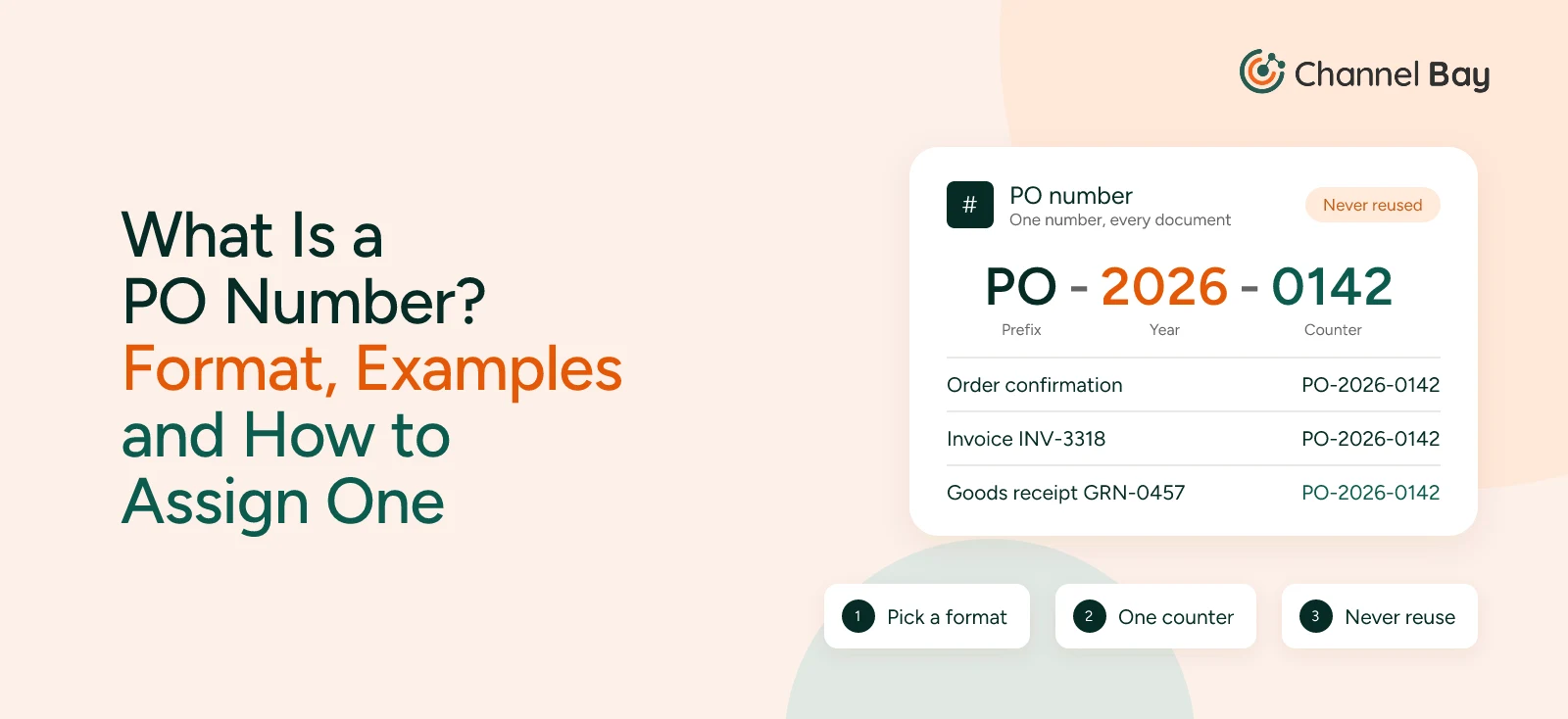
Our running example uses the format PO-YYYY-NNNN, and each part has a job:
- PO marks it as your purchase order. The supplier's invoice (INV-3318), your goods receipt (GRN-0457) and the credit note (CN-0291) each have their own prefix, so nobody mixes them up in an email thread or a bank reference.
- 2026 is the year the order was raised. Anyone who sees the number can tell how old the order is, which matters when an invoice turns up months late.
- 0142 is the counter: this was the brand's 142nd PO of 2026. Four digits with leading zeros means PO-2026-0099 sorts before PO-2026-0142 in a spreadsheet or a file list, and leaves room for 9,999 orders a year. The counter restarts at 0001 each January, and because the year is part of the number, PO-2027-0001 can never be mistaken for PO-2026-0001.
The format leaves things out on purpose. It has no supplier code, because the supplier is already on the PO and a code can't be changed once it's on documents. It has no location code, because this brand ships everything to one warehouse.
A Numbering Scheme for Several Suppliers, Stores and Channels
Most numbering advice assumes one company buying from one office. An online seller often has several suppliers, two or three stores or warehouses, and sales channels that all draw on the same stock. A scheme that holds up under that has a few properties:
- One counter for the whole business. Don't keep a separate sequence for each supplier. The supplier is a field on the PO, so it doesn't need to be in the number, and one counter is the only way to see at a glance whether a number is missing.
- A location code only when it helps. If you order stock into separate stores, a location code in front of the number tells the receiving team where a delivery belongs: LON-PO-2026-0215 for London and MAN-PO-2026-0216 for Manchester, from the same counter. Separate counters per location (LON-0215 and MAN-0215) also work, but only if the location code stays on every copy of the number. Once a supplier's system or an accounting import drops the prefix, two orders share one number.
- Nothing that changes over time. Supplier names, staff initials and channel names all change. A number on an invoice you're paying next month can't.
- The same scheme everywhere you raise POs. Whether a PO comes from inventory software, a spreadsheet or someone's inbox, it takes the next number from the same counter.
Sales channels don't belong in a PO number at all. You buy 500 mugs once and sell them on Shopify, Amazon and in-store, so the PO is for the stock, not the channel.
How to Assign PO Numbers Step by Step
Assigning PO numbers is a setup task you do once and then follow every time. These steps work with inventory software, a spreadsheet or a paper book.
- Choose the format and write it down. For example, PO-YYYY-NNNN, counter restarting each January. Add a location code only if you order into more than one store or warehouse.
- Keep one counter in one place. Inventory or purchasing software does this for you. In a spreadsheet, keep a PO log (number, date, supplier, total, status) in one shared file, and take the next number from it before you start a PO. Our purchase order template explains how, and why two people saving copies of the same template is the first thing that breaks a sequence.
- Choose the starting number. If you're new to purchase orders, start wherever you like: PO-2026-0001, or a higher number so a new supplier doesn't see order #1. If you're moving from Stocky, another app or a spreadsheet, start after the last number you used, so no new PO repeats an old one that a supplier might still quote.
- Assign the number when you create the PO. Not when you send it, and never after. A draft gets its number straight away, and if you abandon it, cancel it rather than delete it.
- Put the number everywhere the order goes. On the PO itself, in the email subject line, and in the file name, such as PO-2026-0142.pdf.
- Ask suppliers to quote it. Put "Quote our PO number on the order confirmation, packing slip, carton labels and invoice" in your PO terms. Hold invoices that arrive without it until they're corrected.
- Quote it yourself. Record the PO number on the goods receipt when a delivery arrives, and put it in the payment reference when you pay. The receiving guide follows PO-2026-0142 from delivery to receipt.
Rules That Keep a PO Number Sequence Clean
A PO sequence stays useful only if every number means one order, for good. These rules cover the cases that cause most of the trouble.
| Situation | What to do | On PO-2026-0142 |
|---|---|---|
| A PO is cancelled | Keep its number and mark it Cancelled. Never give the number to another order | If the brand had cancelled the order, PO-2026-0142 would stay in the log as Cancelled, and the next order would be PO-2026-0143 |
| A draft is abandoned before sending | Cancel it rather than delete it, or note the gap in your PO log | The number still belongs to that draft |
| A PO is amended after sending | Keep the number and add a revision: PO-2026-0142 Rev 1, dated, sent to the supplier | A change from 500 to 600 mugs would go out as PO-2026-0142 Rev 1 |
| The order arrives in several deliveries | Keep one PO and record a goods receipt for each delivery, each quoting the PO number | Two deliveries would mean two receipts, both against PO-2026-0142 |
| Part of the order is on backorder | Leave the balance open on the same PO until it arrives or you cancel it | If the supplier had shipped 400 mugs and backordered 100, the 100 would stay open on PO-2026-0142 |
| Units are rejected on delivery | Leave the shortfall open on the same PO until it's replaced, credited or cancelled | The 20 broken mugs stayed open on PO-2026-0142 until credit note CN-0291 arrived and the brand cancelled the balance |
| You reorder a cancelled balance later | Raise a new PO with a new number, and note the original in it | Had the brand wanted 20 replacement mugs later, they'd go on a new PO, with "replaces balance of PO-2026-0142" in the notes |
Never Reuse a PO Number
Reusing a number is the one mistake a sequence can't recover from. Suppose the brand cancels an order and gives PO-2026-0142 to the next one. A late invoice for the cancelled order still quotes PO-2026-0142, and now it matches a real order, so it can get paid. For the same reason, don't skip numbers on purpose. Starting the sequence at a high number is fine, but after that, every number should follow the last. A gap in the log should always have a reason you can find.
Amended Purchase Orders
When an order changes after the supplier has it, keep the same PO number. The supplier has already put it into its own system, and a new number would leave two open orders for the same mugs. Mark the change with a revision number and a date, send the revised PO, and ask the supplier to confirm it. A new number is for a new order, not a change to an existing one.
Split Deliveries and Backorder Balances
A split delivery doesn't need a new PO. Each delivery gets its own goods receipt, with its own number, against the same PO. The PO shows as partially received until everything arrives. A backorder balance works the same way: it stays open on the original PO. When you decide it isn't coming, cancel the balance, so it stops counting as stock on order. If you still need the units, order them on a new PO.
Location Prefixes Added After the PO Is Created
Some multi-location retailers create a PO and then edit its number to add a location prefix, so PO-1042 becomes 003-1042. That's fine, as long as your software keeps counting from the sequence and not from the edited number. We've seen a sequence that read the renamed numbers as free and kept issuing the same base number again, which left the merchant fixing duplicates every few days. If you rename POs, check the next number your system offers before you trust it.
Moving Your PO Numbers off Stocky or a Spreadsheet
When you change systems, your old PO numbers keep working for months. Suppliers quote them on late invoices and backorder shipments, and your accountant uses them to match payments. So moving your numbering is about two things: bringing the old numbers over exactly, and continuing the sequence without a clash.
- Bring numbers over as text. In the Stocky data we've migrated, merchants with several locations often have PO numbers with a location prefix, such as 003-10457. Import tools that expect a plain number can keep only part of a number like that, and spreadsheets drop the leading zeros from all-digit numbers such as 00142. If only part of each number survives, different orders end up sharing one.
- Continue from your last number. Find the highest number you used in the old system and start the new sequence after it. If you used location prefixes, check every location's numbers, not just one.
- Keep the old POs searchable. When an invoice arrives quoting a number from the old system, you need to find that order without logging into a tool you've stopped paying for.
When a Customer Sends You Their PO Number
The term has a second meaning, from the other side of the sale. When a business buys from you (a retailer stocking your products, or an office ordering in bulk), it may raise its own purchase order with its own PO number and send it to you. To that customer, you're the supplier.
That number is the customer's reference, not part of your sequence. Record it on the sales order and quote it on your packing slip and invoice, exactly as you ask your own suppliers to do. If the invoice doesn't show their PO number, many business customers can't approve it for payment. On Shopify, B2B customers can enter a purchase order number at checkout, and it's kept with the order (Shopify Help Center).
How Channel Bay Numbers Purchase Orders
Channel Bay gives each new PO the next number in your Shopify store's sequence, in the form PO-28001. The number shows when you create the PO, and you can edit it. Behind that:
- The next number is shown, not used up: Opening a new PO shows the number it will get. If you close the form without saving, or the PO fails to save, that number isn't used.
- Location prefixes without breaking the sequence: Edit a PO's number to add a location prefix, such as 001-28001, and the next PO is still PO-28002. A number you type in yourself is kept as you entered it and doesn't move the sequence forward.
- No duplicates: Channel Bay won't save a PO with a number that's already in use. If the sequence later reaches a number you entered by hand, it skips it.
- Stocky numbers kept intact: If you're moving from Stocky, your PO numbers come across exactly as they were, location prefixes and leading zeros included. Our team can set your sequence to carry on from your existing series, so your first PO in Channel Bay follows your last one in Stocky.
Channel Bay keeps one sequence per Shopify store, shared by all its locations. It doesn't add a year or a location code automatically, so if you want those in the number, add them when you create the PO.
See how Channel Bay handles purchase orders, or read our guide to what a purchase order is and how it works.
Frequently Asked Questions
What is a PO number?
Who assigns the PO number, the buyer or the supplier?
Where do I find the PO number on an invoice?
Is a PO number the same as an invoice number?
What does a PO number look like?
Can two purchase orders have the same PO number?
Does an amended purchase order need a new PO number?
Can a customer give me their own PO number?

Guides from the team that builds and supports Channel Bay, the Shopify inventory app for purchase orders, stocktakes, stock transfers and multichannel stock sync. About Channel Bay