Purchase Order: What It Is, How It Works, and How to Create One
A purchase order (PO) is a buyer's commitment to a supplier. Learn how POs work, what to include, the 4 types, and how to create, receive and match one.
On this page
- What is a purchase order?
- Why businesses use purchase orders
- Purchase order vs invoice and other purchasing documents
- How the purchase order process works
- The three-way match: how POs prevent overpaying
- Types of purchase orders
- How to create a purchase order
- Purchase orders for ecommerce sellers
- How purchase orders affect landed cost and COGS
- Purchase order software
- Common purchase order mistakes
- What is purchase order financing?
- Where Channel Bay fits
Key Takeaways
- A purchase order is the buyer's document. It records what you commit to buy, at what price and on what terms, before any goods or money change hands.
- A PO becomes binding once the supplier accepts it. Its PO number then ties together the packing slip, goods receipt, invoice and payment.
- The three-way match (PO, goods receipt, invoice) stops you paying for stock that never arrived or arrived damaged.
- Most online sellers need standard POs for products and blanket POs for packaging. Planned and contract POs come later, with key manufacturers.
- For online sellers, receiving against the PO keeps stock accurate on every channel and turns the PO unit price into a true landed cost.
A purchase order (PO) is a formal document a buyer sends to a supplier to order goods or services. It lists exactly what is being bought, how many units, at what price, when it should arrive, and on what payment terms. Once the supplier accepts it, the purchase order becomes a binding agreement: the supplier commits to deliver, and the buyer commits to pay.
Almost every business that buys from suppliers uses POs. For ecommerce sellers, they are the backbone of inventory replenishment. A PO tells you what stock is on its way, what you have committed to spend, and, once it is received, what each unit really cost.
This guide follows one example order, PO-2026-0142 for 500 ceramic mugs, from approval to final payment. Along the way it covers what a PO contains, how it differs from an invoice, the four types, how to create one, and how sellers on Shopify and Amazon use them.
What Is a Purchase Order?
A purchase order is a commercial document issued by a buyer to a seller that authorizes a purchase. It specifies the products or services, quantities, agreed prices, delivery date, ship-to location and payment terms. Each PO carries a unique PO number so both sides can track it.
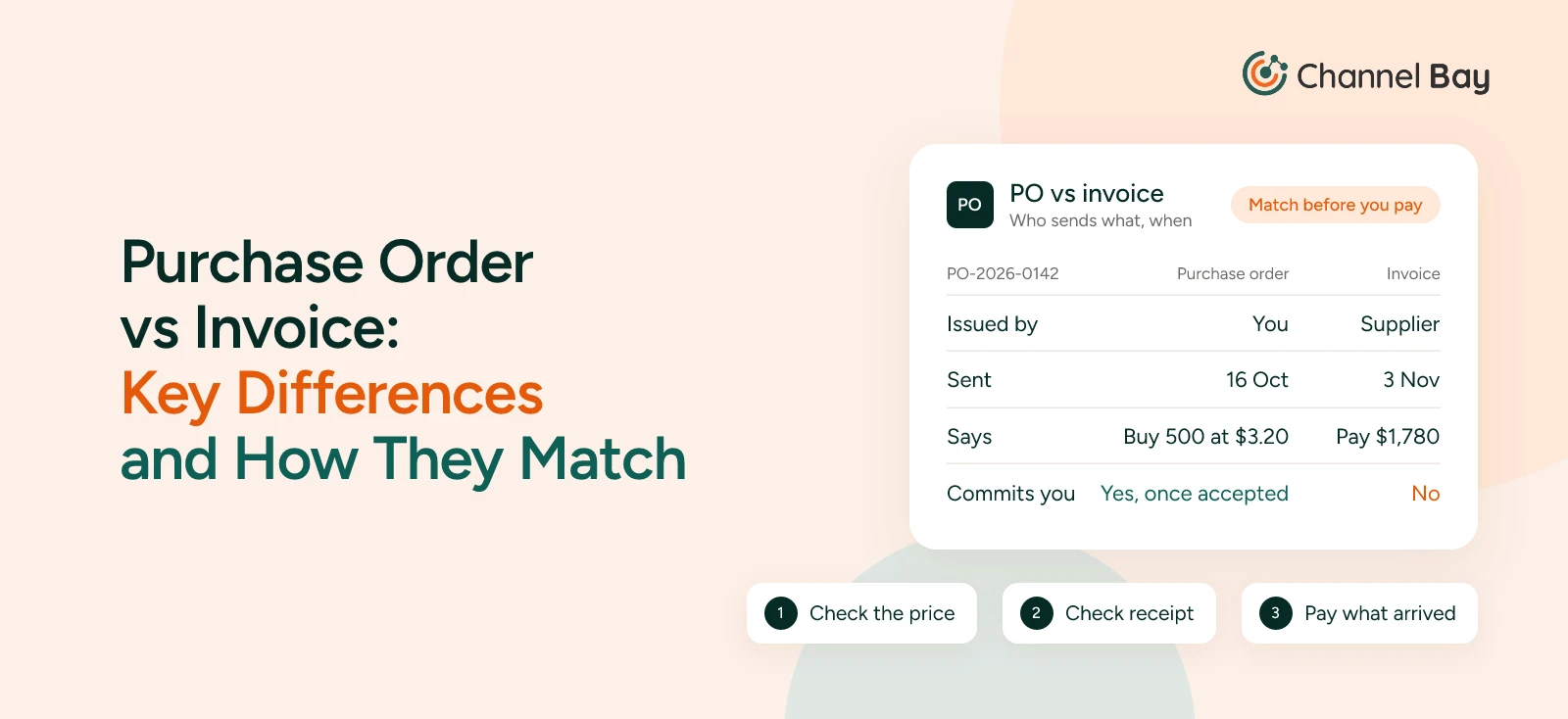
The PO is created by the buyer, not the supplier, and that distinction matters. An invoice is the supplier saying "here is what you owe us," while a purchase order is the buyer saying "here is what we agree to buy." On the supplier's side, your PO usually becomes a sales order in their system.
What Is a PO Number?
A PO number is the unique reference assigned to each purchase order, for example PO-2026-0142. The supplier quotes it on the order confirmation, packing slip and invoice, and your team quotes it on the goods receipt and the payment. That single number is what lets anyone trace a payment back to the commitment behind it.
Use one sequential scheme, generated automatically where possible, and never reuse or skip a number. For formats that scale across suppliers and locations, see our guide to purchase order numbers.
Is a Purchase Order Legally Binding?
A purchase order on its own is an offer. It becomes a binding contract once the supplier accepts it, either by promising to ship (ideally in writing) or by shipping the goods. In the US, the Uniform Commercial Code says an order for prompt shipment can be accepted either way (UCC § 2-206, Cornell Legal Information Institute). Other countries have their own contract rules, so check locally for anything high-value.
After acceptance, neither side can change quantities, prices or terms without the other's agreement. The clean way to amend an accepted PO is to issue a revised version with a change note, rather than quietly editing the original.
Purchase Orders for Goods and for Services
POs are most often associated with physical stock, such as 500 units of a SKU from a factory. They are just as common for services: an agency retainer, a cleaning contract, software licenses or equipment maintenance. Many larger companies run a "no PO, no pay" rule, which means finance will not pay an invoice that does not reference an approved PO.
Why Businesses Use Purchase Orders
Purchase orders give a business control over what it buys and a clear record of every commitment. Without them, purchasing runs on emails and memory, and mistakes surface only when an invoice or a shipment does not look right.
- Spend control and approvals: A PO makes a purchase get approved before money is committed. A rule such as "any PO over $5,000 needs a manager's sign-off" stops unplanned or duplicate spending.
- Fewer disputes with suppliers: Both parties work from the same document. If 1,000 units arrive invoiced at $4.10 each when the PO said $3.90, the PO settles the question.
- Visibility of incoming stock: Open POs show what inventory is on its way and when. If 600 units are due in two weeks, you do not reorder today just because shelf stock looks low.
- Cash flow planning: Every open PO is a future payment. Adding up open POs by payment date shows how much cash you need over the next 30, 60 or 90 days.
- An audit trail: POs create a documented chain from request to payment, which makes it far easier to answer an accountant's or auditor's questions about a purchase.
Purchase Order vs Invoice and Other Purchasing Documents
A purchase order is often confused with the documents around it. The simplest way to tell them apart is to ask who creates each one, and when.
| Document | Created by | When | Purpose |
|---|---|---|---|
| Purchase requisition | Buyer's team (internal) | Before the PO | Asks for approval to buy; never sent to the supplier |
| Purchase order | Buyer | Before delivery | Commits to buy specific goods on agreed terms |
| Sales order | Supplier | After receiving the PO | The supplier's internal record for fulfilling your order |
| Packing slip | Supplier | At shipment | Lists what is inside the shipment |
| Goods receipt | Buyer | On delivery | Records what actually arrived |
| Invoice | Supplier | After shipment | Requests payment |
| Payment receipt | Supplier | After payment | Confirms payment was received |
Purchase Order vs Invoice
The purchase order comes first and is issued by the buyer. The invoice comes later and is issued by the seller. A PO says "we will buy this"; an invoice says "please pay for this." A good invoice always quotes the PO number so the two can be matched. For the full comparison, including what to do when they disagree, see purchase order vs invoice.
Purchase Order vs Sales Order
These are mirror images of the same deal. Your purchase order becomes the supplier's sales order. If you sell wholesale to retailers, you receive their POs and create sales orders yourself.
Purchase Order vs Purchase Requisition
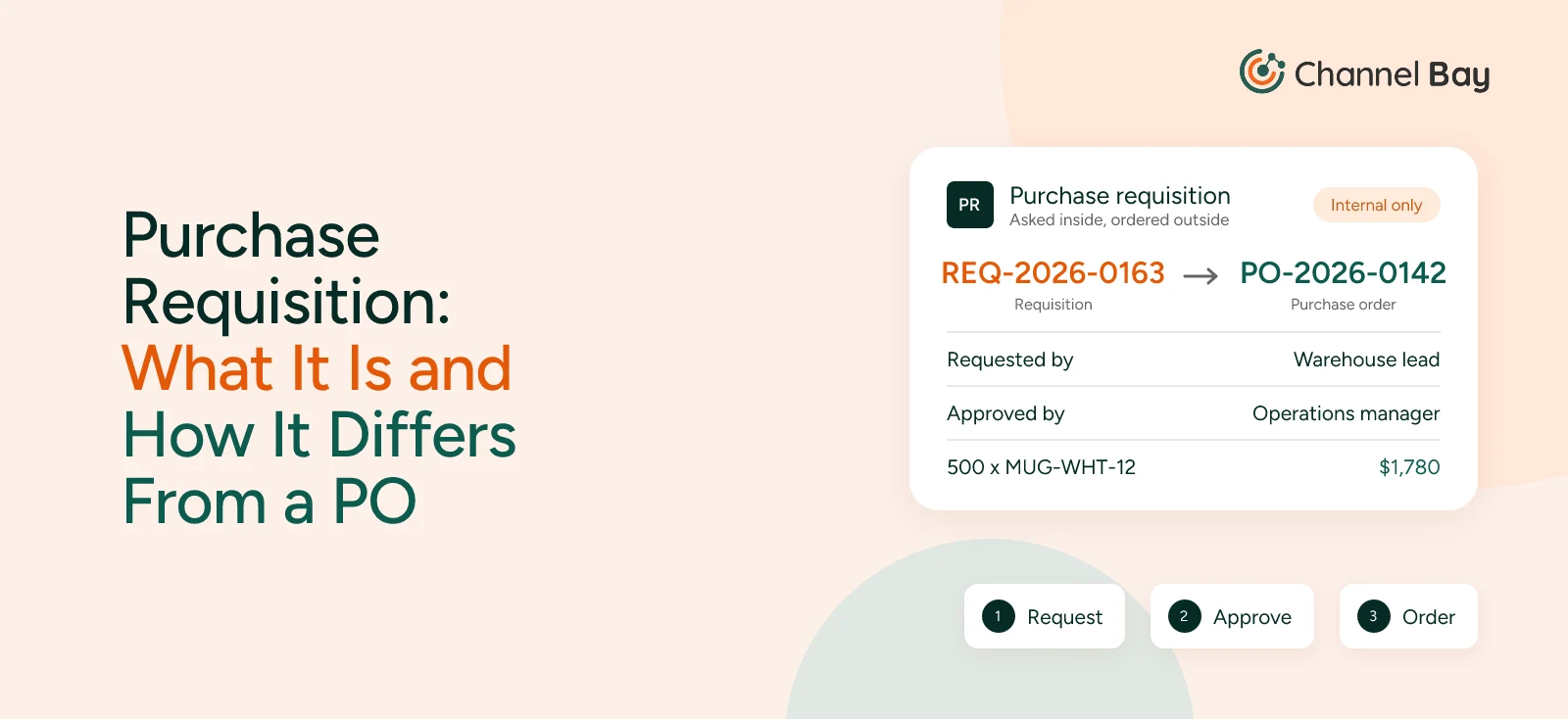
A requisition is an internal request to buy something. A purchase order is the external commitment that follows once the requisition is approved. For what goes on a requisition and when a small team needs one, see our guide to purchase requisitions.
How the Purchase Order Process Works
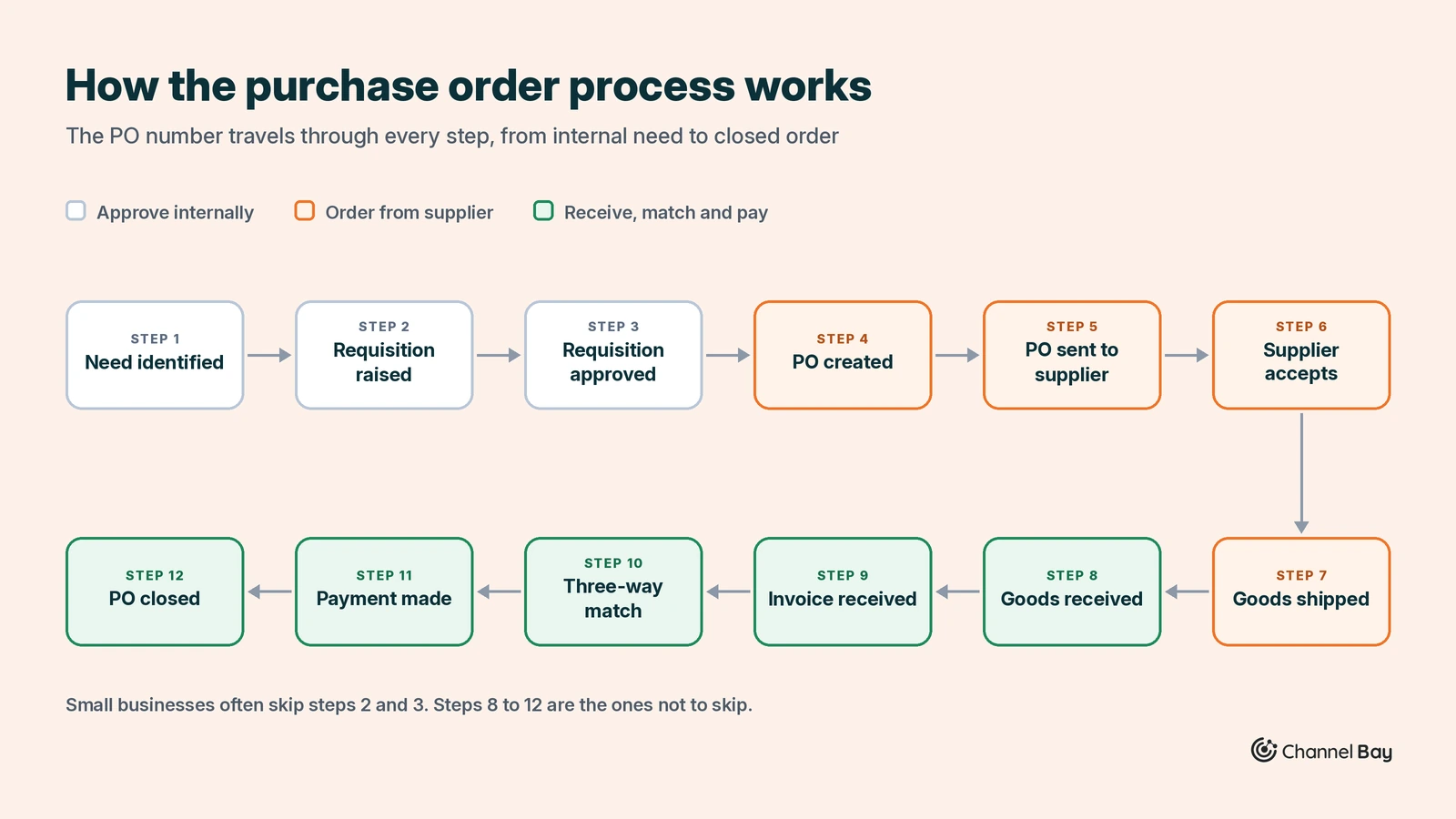
The purchase order process runs from an internal need to a closed, paid order. The PO number travels through every step, so each document can be traced back to the original commitment.
- Need identified: Stock falls below its reorder point, a product launch is planned, or a team needs a service.
- Purchase requisition raised: Someone submits an internal request describing what is needed. This document never goes to the supplier.
- Requisition approved: A manager or budget owner approves it under the business's spending rules.
- PO created: Purchasing turns the approved requisition into a PO with prices, quantities and terms.
- PO sent to the supplier: By email, a supplier portal, EDI, or directly from inventory software.
- Supplier accepts: The supplier confirms, sometimes proposing changes to quantities or dates. Acceptance makes the PO binding.
- Goods shipped: The supplier ships with a packing slip that references the PO number.
- Goods received: Your team counts the delivery and records a goods receipt against the PO, including any short or damaged quantities.
- Invoice received: The supplier bills you, quoting the PO number.
- Three-way match: Accounts payable compares the PO, the goods receipt and the invoice.
- Payment made: If everything matches, or once differences are resolved, the invoice is paid on the agreed terms.
- PO closed: The PO is marked complete and archived.
Small businesses often skip steps 2 and 3 and create the PO directly. Steps 8 to 12 are the ones not to skip.
A Worked Purchase Order Example
A kitchenware brand selling on Shopify and Amazon sees that its white mugs have dropped to 80 units, below the reorder point of 150. The warehouse lead raises a requisition for 500 units, and the operations manager approves it.
Purchasing creates PO-2026-0142: 500 x MUG-WHT-12 at $3.20, plus $180 freight, for a total of $1,780. Delivery is due by 10 November, payment Net 30. The supplier accepts the same day.
The shipment arrives with 480 good mugs and 20 broken ones. The warehouse records a receipt of 480, so the PO shows as partially received. The supplier's invoice, however, bills the full $1,780.
The three-way match flags the gap. Accounts payable holds payment and contacts the supplier, who issues a $64 credit note for the 20 broken mugs. The business pays $1,716 within 30 days and closes the PO.
Without the receipt, the business would have paid $64 for mugs it could never sell. And the 480 mugs that went on sale cost at least $3.58 each once freight was spread across them ($1,716 / 480), not the $3.20 on the PO line. Add import duties and fees, and the true landed cost of each mug is $3.83.
Purchase Order Statuses
A PO's status tells you where it sits in the process at a glance. Exact labels vary by software, but most systems use a version of these seven.
| Status | What it means | What to do next |
|---|---|---|
| Draft | Created but not yet sent or approved | Review lines and prices, get approval |
| Pending approval | Waiting on a manager or budget owner | Approver signs off or sends it back |
| Ordered (sent) | Sent to the supplier, awaiting confirmation or delivery | Chase confirmation, track the ship date |
| Partially received | Some units have arrived, others are outstanding | Receive the remaining units or cancel the balance |
| Received | All units have arrived and been counted | Match the invoice and pay |
| Closed | Received, matched and paid | Nothing; archive it |
| Cancelled | Withdrawn before fulfillment | Confirm the cancellation in writing with the supplier |
PO-2026-0142 moved from Draft to Pending approval to Ordered on 16 October. It became Partially received when 480 of the 500 mugs were booked in, and Closed once the 20-unit balance was cancelled and the credit note was matched.
An open PO is any PO that is not yet closed or cancelled. Reviewing open POs weekly is one of the simplest ways to spot late suppliers, forgotten partial deliveries and cash commitments you had lost track of.
The Three-Way Match: How POs Prevent Overpaying
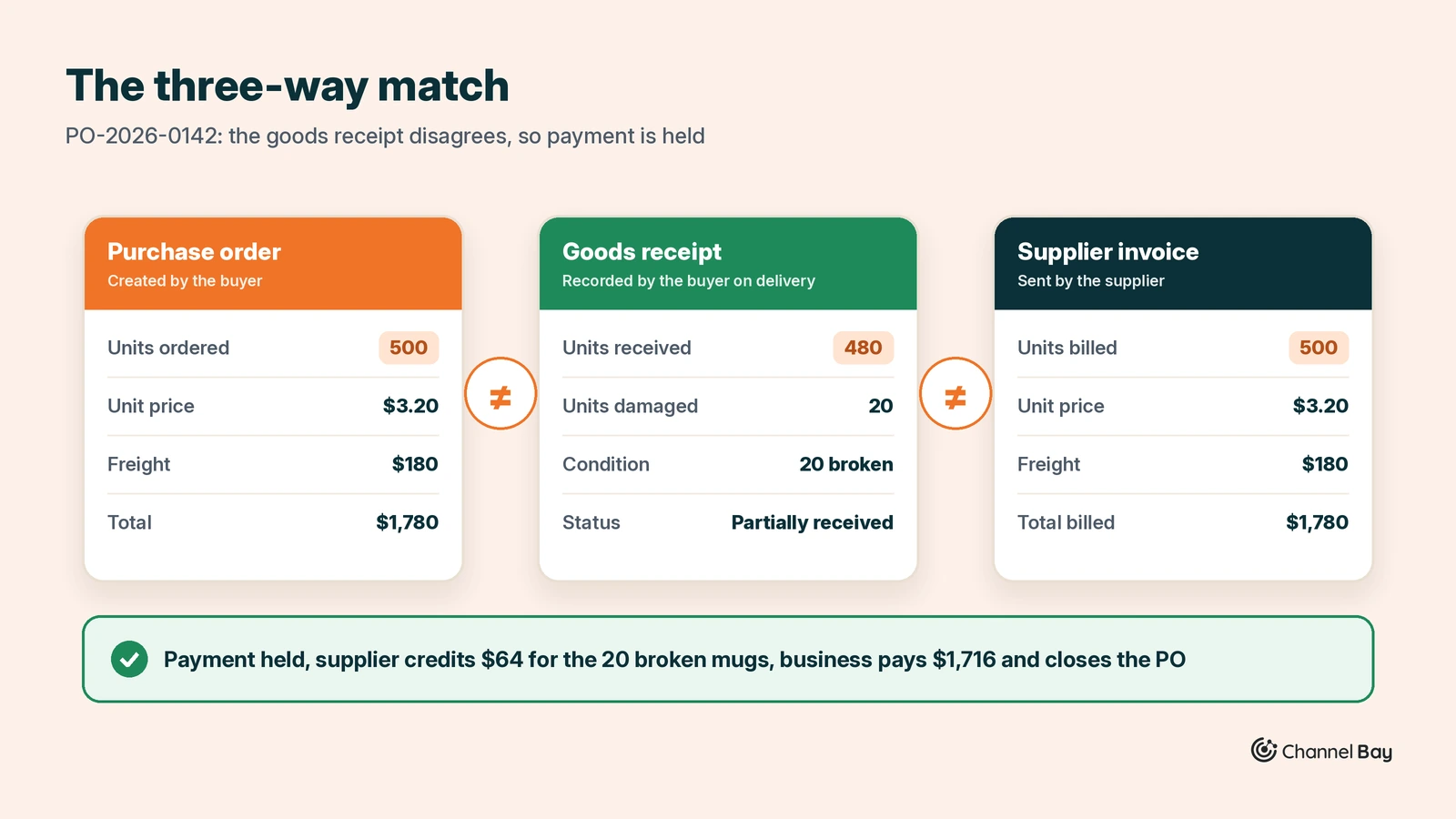
The three-way match compares three documents before a supplier is paid: the purchase order, the goods receipt and the supplier's invoice. If quantities and prices agree across all three, the invoice is approved. If they do not, payment is held until the difference is resolved.
| Document | Created by | What it confirms | PO-2026-0142 |
|---|---|---|---|
| Purchase order | Buyer | What was ordered, at what price and on what terms | 500 mugs at $3.20 plus $180 freight, $1,780 |
| Goods receipt | Buyer, on delivery | What actually arrived, and in what condition | 480 good mugs, 20 broken |
| Invoice | Supplier | What the supplier is billing | 500 mugs plus freight, $1,780 |
On PO-2026-0142, the receipt is 20 units short of both the PO and the invoice, so payment is held until the supplier credits $64. That is the match doing its job.
The three-way match catches short shipments, damaged units, price changes the supplier never agreed with you, and duplicate invoices. Smaller businesses sometimes use a two-way match (PO and invoice only), which checks pricing but not whether the goods arrived. Larger operations may use a four-way match, adding a quality inspection report before payment.
Some accounting and procurement tools automate the match and let you set a tolerance, for example flagging any line where the invoice differs from the receipt by more than 2% or $50. If yours does not, the manual version still works: record the supplier's invoice number on the receipt, and check the two side by side before you pay. For tolerance rules and how to resolve each type of mismatch, see our guide to the three-way match.
Types of Purchase Orders
There are four main types of purchase orders. They differ in how much is fixed when the PO is issued: the items, the quantities, the price and the delivery dates.
| Type | Items | Quantity | Price | Delivery dates | Best for |
|---|---|---|---|---|---|
| Standard PO | Fixed | Fixed | Fixed | Fixed | One-off or batch restocks |
| Planned PO | Fixed | Fixed | Fixed | Tentative, released later | Committed volume delivered in batches |
| Blanket PO | Fixed | Open, up to a quantity or spending cap | Fixed | Open | Frequent reorders from one supplier |
| Contract PO | Open | Open | Terms only | Open | Master supplier agreements |
Standard Purchase Order
The most common type, and what most people mean by "a PO." Everything is known upfront, so it can be issued, received and closed in one cycle. PO-2026-0142 is a standard PO.
Planned Purchase Order
You commit to a total quantity and price, then issue releases when you want deliveries. For example, 10,000 bottles for the year, released as 2,500 per quarter, locks in pricing or production capacity without taking all the stock at once.
Blanket Purchase Order
A blanket PO sets agreed prices and a spending ceiling over a period, such as "up to $50,000 of packaging over 12 months," without fixing quantities or dates. Each reorder is a release against the blanket PO rather than a new PO. See how to set one up in our guide to blanket purchase orders.
Contract Purchase Order
A contract PO sets the legal and commercial terms with a supplier: pricing rules, payment terms, liability and quality standards. It does not order anything itself. Standard POs are issued later and reference it.
Other Purchase Order Variants
Some PO names describe how an order is handled rather than how it is committed:
- Drop-ship PO: The supplier ships directly to your customer instead of your warehouse.
- Recurring PO: The same order repeats on a schedule, such as monthly supplies.
- Rush PO: Raised outside normal approval timelines, often with expedited freight.
- Consignment PO: The supplier places stock with you, and you pay only for what sells.
- Service PO: Covers work instead of goods, such as consulting or maintenance.
- Transfer order: Moves stock between your own locations. It is not a purchase, but it often lives in the same software. See our guide to inventory transfers.
How to Create a Purchase Order
Creating a purchase order means writing down terms you have already agreed with the supplier, in enough detail that they can fulfill it without a follow-up question. The same fields and steps apply whether you use a spreadsheet, accounting software or an inventory app.
What to Include in a Purchase Order
| Field | What it contains | PO-2026-0142 |
|---|---|---|
| PO number | A unique, sequential reference | PO-2026-0142 |
| Order date | When the PO was issued | 16 October 2026 |
| Buyer details | Company name, billing address, contact person | Your business and purchasing contact |
| Supplier details | Supplier name, address, contact, supplier ID | Factory or wholesaler |
| Ship-to address | Where the goods should be delivered | Warehouse, store or 3PL |
| Line items | SKU or supplier part number, description, variant | MUG-WHT-12, white ceramic mug, 12 oz |
| Quantity | Units ordered per line | 500 |
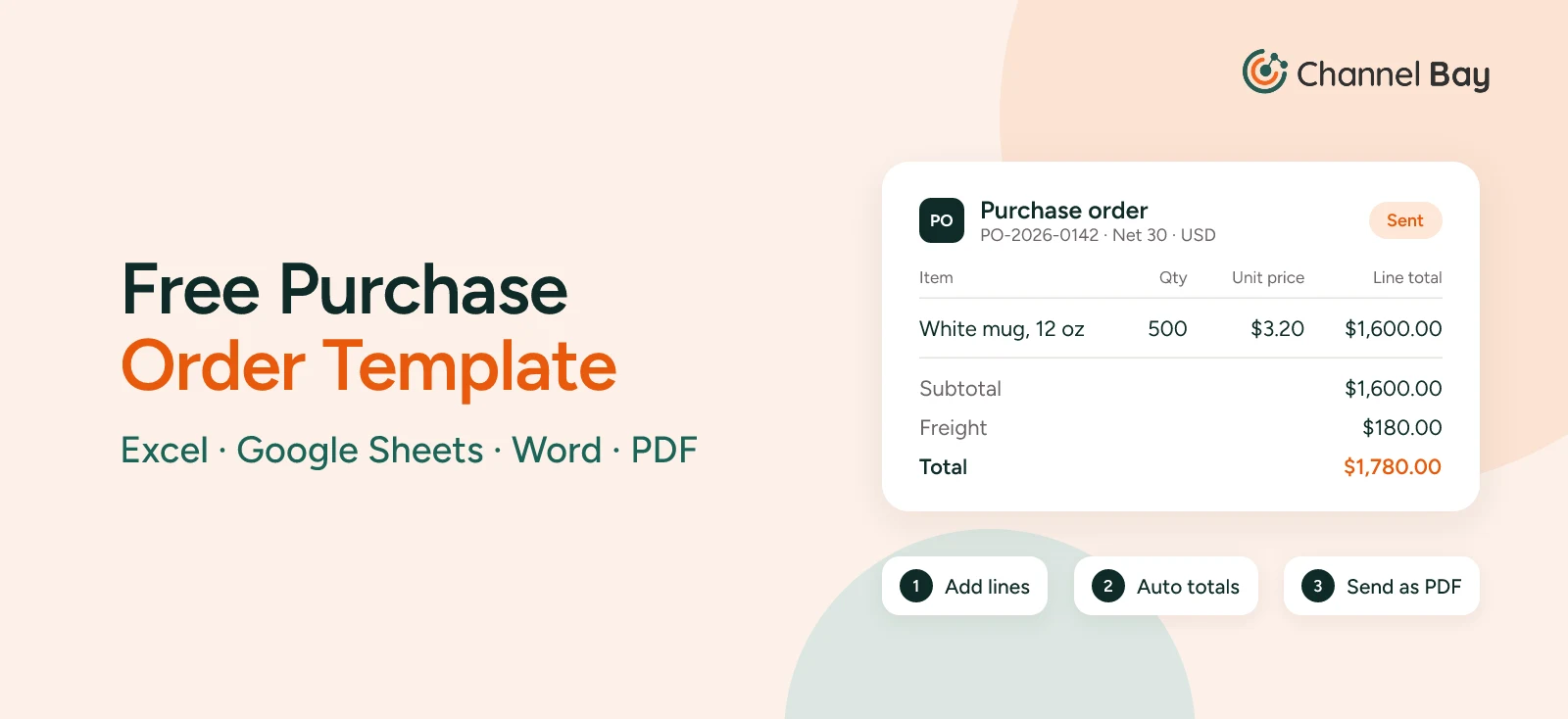
| Unit price and line total | Agreed price per unit, and quantity x price | $3.20, $1,600.00 |
| Additional costs | Freight, duties, taxes, discounts | $180 freight |
| Grand total | Sum of all lines and additional costs | $1,780.00 |
| Delivery date | When the goods are expected | 10 November 2026 |
| Payment terms | When and how the supplier is paid | Net 30 |
| Shipping terms | Who pays for, and carries the risk of, goods in transit (Incoterms) | FOB Shenzhen |
| Notes and conditions | Packaging, labeling, quality requirements | Barcode labels on every unit |
| Authorization | Name or signature of the approver | Operations manager |
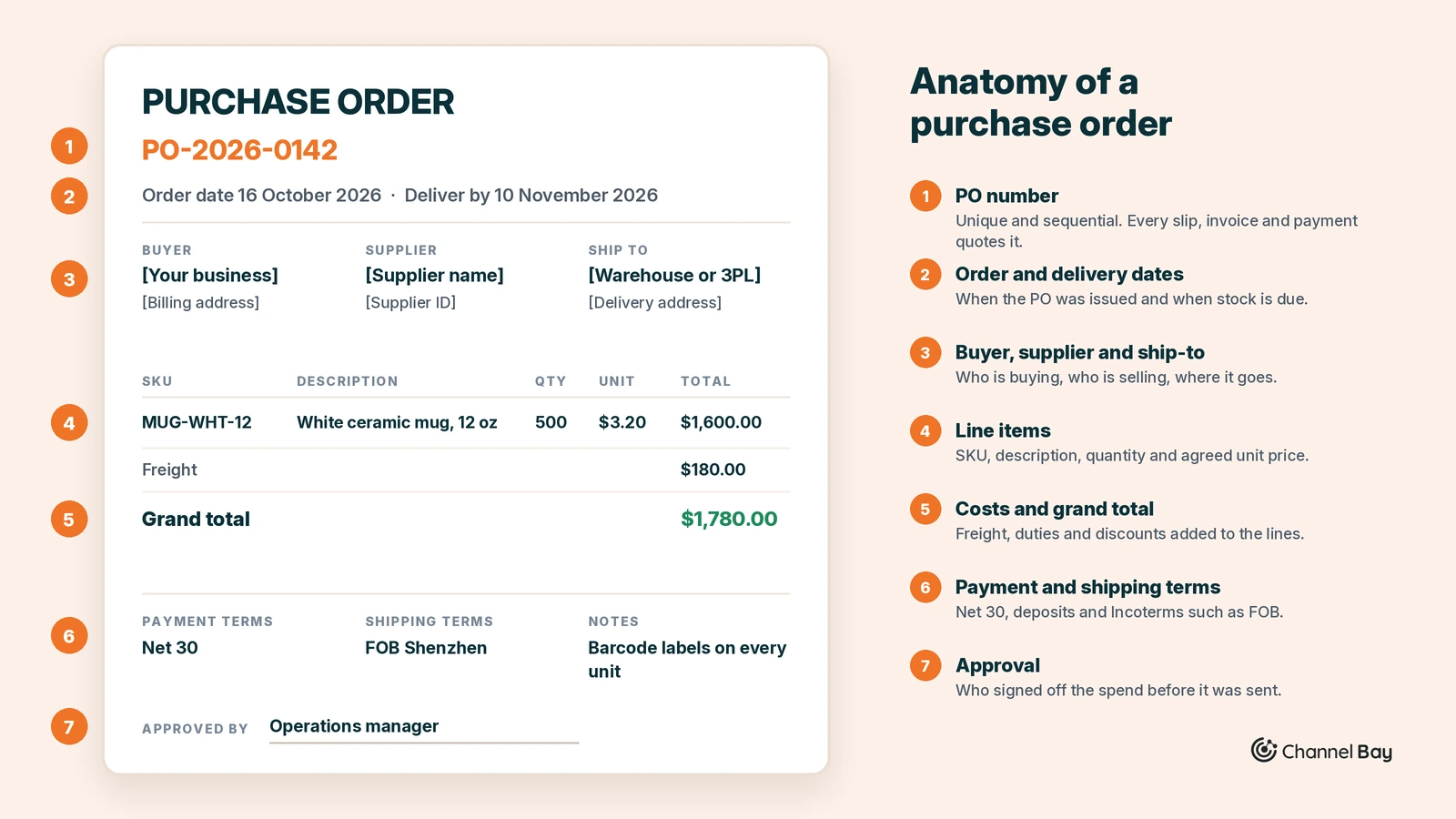
Common payment terms include Net 30 (pay within 30 days of the invoice), Net 60, 2/10 Net 30 (a 2% discount if paid within 10 days, otherwise the full amount is due in 30), and deposit terms such as 30/70 for overseas manufacturing. Shipping terms like FOB and DDP are Incoterms rules, published by the International Chamber of Commerce. They decide whether freight and import duties sit with you or the supplier, which changes what each unit really costs. They do not decide when ownership passes; that belongs in your contract.
For a ready-made layout with these fields, download our free purchase order template in Excel, Google Sheets, Word or PDF. It also gives the formulas if you'd rather build your own in Excel or Google Sheets.
How to Create a Purchase Order Step by Step
- Confirm the need and get approval. Start from a real trigger: stock below its reorder point, a planned launch, or a forecast. If your business requires sign-off, get the requisition approved first.
- Agree prices and terms in writing. Confirm unit prices, minimum order quantities (MOQs), lead time and payment terms with the supplier. With a quote in hand, the PO only has to restate what is already agreed.
- Assign a unique PO number. Use a consistent sequence such as PO-2026-0142. Every packing slip, invoice and payment will reference it, so it must never repeat.
- Add buyer, supplier and delivery details. Include your billing address and contact, the supplier's details, the ship-to location and the expected delivery date.
- List each line item precisely. For every product, give the SKU or supplier part number, the full description including variant (size, color), quantity, unit price and line total. Vague descriptions are a common cause of wrong shipments.
- Add costs, totals and terms. Add freight, duties, taxes and discounts to reach the grand total. State the payment terms, currency, shipping terms and any packaging or labeling requirements.
- Review, send and get written acceptance. Check every line against the quote, then send the PO. Ask the supplier to confirm acceptance in writing, because acceptance is what makes the PO binding.
Once the supplier accepts, the PO moves into receiving, matching and payment: steps 8 to 12 of the purchase order process.
Purchase Orders for Ecommerce Sellers
Purchase orders are not specific to ecommerce. Manufacturers use them for components, restaurants for food and linens, construction firms for materials, hospitals for medical supplies, and government agencies for almost everything they buy. The document is the same everywhere. What changes is the system it connects to: corporates and public bodies use POs mainly to control spending, while inventory-driven businesses use them to manage stock.
For online sellers, a purchase order is mainly an inventory tool. It tells you what stock is inbound, which location it is going to, when it will arrive, and what it really cost. Get POs right and stock levels stay accurate across every sales channel. Skip them and you oversell, overbuy or misprice.
Which Purchase Order Types Online Sellers Need
Most online stores need just two or three PO types:
| Seller type | What fits best |
|---|---|
| DTC brand holding its own inventory | Standard POs for products, blanket POs for packaging |
| Marketplace seller sourcing from overseas factories | Standard POs with deposit terms, shipped to a warehouse or prep center |
| Dropshipper or print-on-demand seller | Drop-ship POs, usually generated automatically per customer order |
| Handmade or small-batch seller | Simple standard POs for raw materials once volume grows |
| Multichannel brand at scale | Standard and blanket POs, adding planned or contract POs with key manufacturers |
When to Raise a Purchase Order: The Reorder Point
The reorder point tells you when to raise the next PO:
Reorder point = (average daily sales x lead time in days) + safety stock
The mug brand sells an average of 4 mugs a day, its supplier's lead time is 25 days, and it keeps 50 mugs of safety stock. Its reorder point is (4 x 25) + 50 = 150 units, which is why PO-2026-0142 was raised when stock hit 80: the brand was already 70 units late.
For safety stock formulas and seasonal adjustments, see our guide to the reorder point, and how forecasting works for how Channel Bay times reorders per SKU from your own sales and supplier lead times.
Purchase Orders in Shopify
Shopify merchants can create purchase orders natively under Products > Purchase orders, link them to suppliers, and receive stock into a location through a linked inventory transfer. Shopify ended Stocky access on 31 August 2026, which moved many merchants onto native POs or a dedicated inventory app. If you are still working out where your Stocky data stands, see whether your Stocky is still working.
Native POs cover the basics: suppliers, costs per item, payment terms, partial receiving, and shipping or duty costs added to the transfer as cost adjustments. What they leave out is reorder suggestions, landed cost worked into each unit on the PO, and sending the PO to the supplier (you export a PDF and email it yourself). Merchants with many suppliers or several locations usually add an app for those.
For the full Shopify workflow, apps and setup, see our guide to Shopify purchase order management. If you only need the native steps, see how to create a purchase order in Shopify.
Purchase Orders on Amazon
"Amazon purchase order" means two different things. In Vendor Central (first-party selling), Amazon is the buyer: it sends POs to brands, and vendors confirm or reject them and ship to Amazon's requirements. In Seller Central (third-party selling, including FBA), you are the buyer: you raise POs to your own suppliers, then ship stock to your warehouse, a prep center or Amazon fulfillment centers.
Both workflows are covered in our guide to Amazon purchase orders. For most Seller Central brands, the harder question is what happens after receiving: whether new stock reaches the Amazon listing as well as the Shopify store. See how to sync Shopify and Amazon inventory.
Purchase Orders on Other Ecommerce Platforms
Most other store builders and marketplaces, such as WooCommerce, BigCommerce, Wix, Squarespace, Etsy and eBay, do not include full purchase order management in their core product. Sellers on these platforms usually rely on an inventory app, an accounting tool or a spreadsheet, and the hard part is keeping stock in sync once a PO is received.
Selling on Multiple Channels
If you sell on Shopify, Amazon and a marketplace at once, receive every PO into one central inventory system. Stock received against a PO should update available quantities on all channels at the same time. Otherwise a channel keeps selling units that are already gone, or hides units that just arrived.
How Purchase Orders Affect Landed Cost and COGS
The unit price on a purchase order is rarely what a product really costs you. Landed cost is the full cost of getting a unit into sellable stock: the supplier price plus freight, insurance, import duties, customs brokerage, and payment or currency fees. Recording landed cost on each PO is what gives you an accurate cost of goods sold (COGS) and real margins.
Landed Cost Example: PO-2026-0142
After the credit note, the mug brand paid the supplier $1,716 for 480 good mugs, including $180 freight. Its freight forwarder then billed $96 in import duties and $24 in brokerage and bank fees.
| Cost component | Total | Per unit (480 mugs) |
|---|---|---|
| Supplier price | $1,536 | $3.20 |
| Freight | $180 | $0.38 |
| Import duties | $96 | $0.20 |
| Brokerage and bank fees | $24 | $0.05 |
| Landed cost | $1,836 | $3.83 |
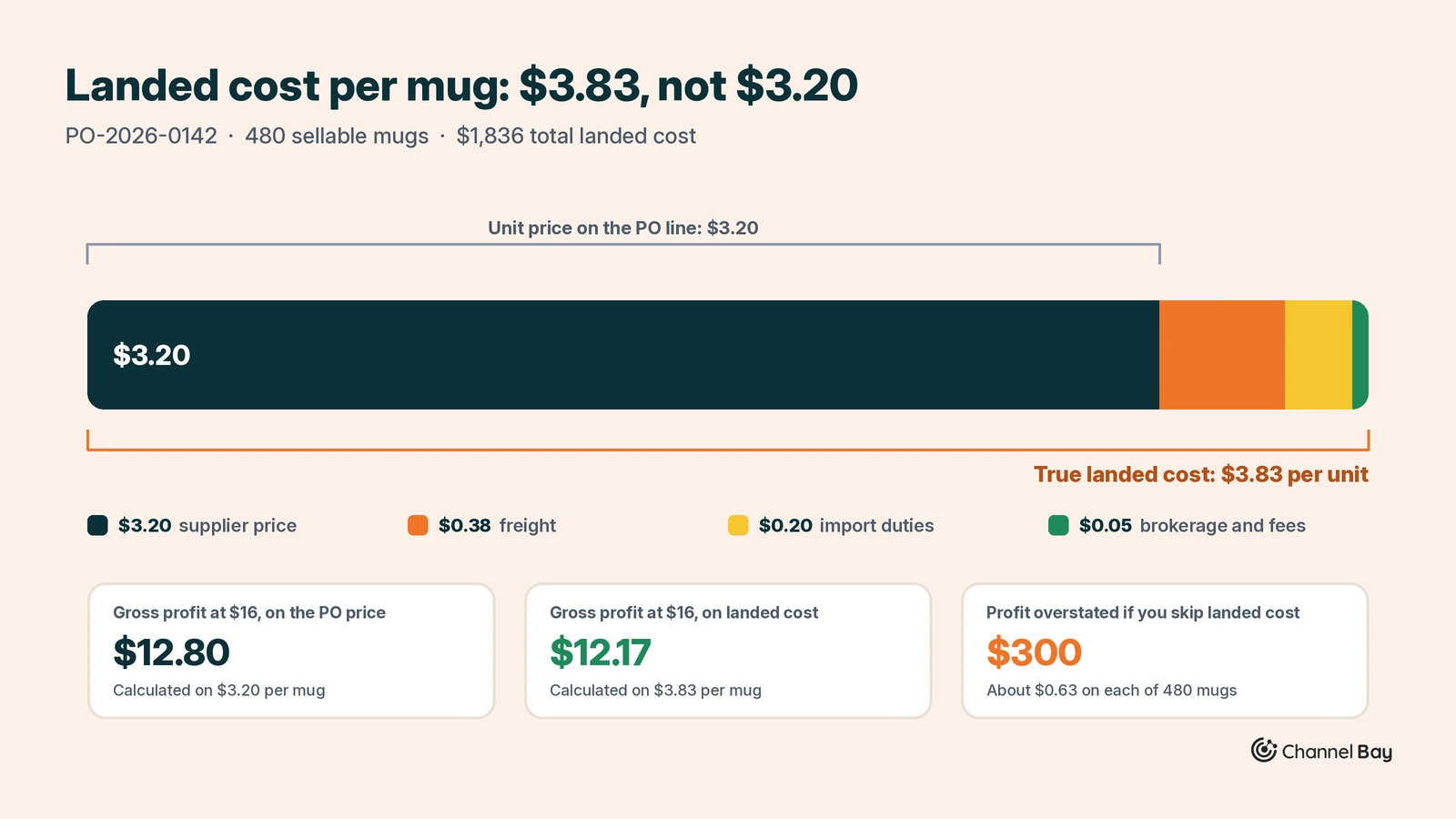
The true unit cost is $3.83, not the $3.20 on the PO line. If the mug sells for $16 and you calculate margin on $3.20, you overstate gross profit by about $0.63 on every unit, or $300 across the order.
This example spreads costs evenly per unit because the PO has one line. When a PO mixes cheap and expensive products, a common approach is to spread freight and fees by each line's value, so a $40 item carries more of the cost than a $4 one. Some businesses spread freight by weight or volume instead, which suits bulky, low-value goods. For allocation methods in detail, see our guide to landed cost.
Why Receiving Against the PO Matters
When stock is received against a PO, inventory software updates on-hand quantities and the unit cost at the same moment. That keeps two things accurate: available stock on every sales channel, and the cost your profit reports use.
Receiving stock by editing quantities by hand skips both. The count goes up, but nothing records which supplier it came from, what it cost, or what is still outstanding on the PO. That is how stock counts drift and margins quietly go wrong. Our goods receipt guide covers how to count a delivery against the PO and what to do with short, damaged and extra units.
Average Cost vs FIFO for Purchase Order Costs
Many systems value inventory at a weighted (rolling) average cost. Say the mug brand still held 120 mugs from an earlier PO at $3.60 when PO-2026-0142 arrived. The new average is $3.78 per mug: (120 x $3.60 + 480 x $3.825) / 600. Every PO you receive shifts this average, which is why a missing or wrong PO cost ripples into every sale that follows.
The alternative is to keep each delivery's cost separately and decide which one a sale uses. With oldest cost first (FIFO), the next 120 sales cost $3.60 each and the 480 after that cost $3.83. When supplier prices are moving, that shows you exactly when your margin changed, where an average blurs it. LIFO (newest cost first) is permitted under US GAAP but not under IFRS. Ask your accountant which method to report on. Channel Bay's cost tracking keeps each delivery's cost and shows FIFO and LIFO side by side on the same stock.
Purchase Order Software
The right purchase order software depends on how many POs you raise, whether you hold physical inventory, and how many locations and channels you run. Most businesses move up these categories as they grow.
| Category | Best for | Examples | Strength | Limitation |
|---|---|---|---|---|
| Spreadsheets and templates | Fewer than 5 POs a month | Excel, Google Sheets | Free and flexible | No stock sync, manual matching |
| Accounting software | POs tied to bills and payables | QuickBooks Online, Xero, Zoho Books, Sage | Turns a PO into a bill | Treats POs as finance, not stock |
| Ecommerce inventory apps | Online sellers on Shopify and marketplaces | Channel Bay, Stockie, Prediko | Receiving updates store stock and unit cost | Marketplace sync varies; check before you buy |
| Standalone inventory systems | Wholesale and multi-location product businesses | Zoho Inventory, inFlow, Cin7 | Reorder points, multi-location receiving | Another system to integrate |
| Manufacturing (MRP) | Businesses that build products | Katana, MRPeasy, Odoo MRP | POs driven by bills of materials | More setup than retail needs |
| ERP | Mid-market and enterprise | NetSuite, Dynamics 365 Business Central, SAP Business One, Acumatica | One system for procurement, stock and finance | Cost and implementation time |
| Procurement platforms | Controlling company-wide spend | Procurify, Coupa, Precoro, SAP Ariba | Approval workflows, budgets, supplier portals | Not designed for resale inventory |
Accounting and procurement tools treat a PO as a financial commitment, while inventory tools treat it as incoming stock. If you sell physical products, you need the second, connected to the first. When comparing tools, check for reorder suggestions, partial receiving, landed cost allocation, multi-location receiving, PO emails to suppliers, an accounting connection, and real-time stock updates on every channel. For a full comparison by business type, see our guide to purchase order software.
Common Purchase Order Mistakes
Most purchase order problems come from a handful of habits. Each mistake below is paired with the practice that prevents it.
| Common mistake | What goes wrong | Best practice |
|---|---|---|
| Vague line items | Supplier ships the wrong size or color | Use SKUs or supplier part numbers on every line |
| No written acceptance | Supplier disputes the price or quantity later | Get confirmation in writing before production starts |
| Ignoring lead times | Stock runs out before the PO arrives | Set a reorder point that covers the lead time plus safety stock |
| Editing stock instead of receiving | Counts drift and costs go wrong | Always receive deliveries against the PO |
| Recording only the unit price | COGS is understated and margins overstated | Add freight, duties and fees as landed cost |
| Paying without matching | Paying for short or damaged shipments | Run the three-way match on every invoice |
| Leaving partial POs open | Phantom inbound stock distorts reordering | Receive the balance or cancel it within a set time |
| Reusing or skipping PO numbers | Documents cannot be traced | Use one automatic, sequential numbering scheme |
The open partial PO is the easiest one to miss in ecommerce. If the mug brand had not cancelled the 20-unit balance on PO-2026-0142, its system would still show 20 mugs inbound. Any reorder suggestion that counts stock on order would then hold back the next reorder for mugs that are never coming.
What Is Purchase Order Financing?
Purchase order financing is short-term funding that pays your supplier so you can fulfill a confirmed customer order you could not otherwise afford to produce. A brand with a $100,000 PO from a retail chain, for example, has the financer pay its manufacturer directly; the retailer then pays the financer, who deducts its fees and passes the rest to the brand. Fees are charged as a share of the order value for each month the money is out, so it suits orders with healthy margins and buyers who pay on time.
It is used mainly by brands selling wholesale to retailers or distributors, not by sellers restocking their own store, who more often use inventory financing or revenue-based financing. For how it compares with invoice and inventory financing, see our guide to purchase order financing.
Where Channel Bay Fits
Channel Bay is a Shopify app built around the ecommerce side of purchase orders. It suggests what to reorder from sales and supplier lead times, emails the PO to the supplier as a PDF, and lets you receive each delivery as its own batch with its own freight and invoice number. Supplier currency is converted, then freight and discounts are spread across the lines by value, so every unit gets a landed cost, and received stock updates on Shopify and Amazon in the same step.
If you are setting up purchase orders for the first time, or moving off Stocky or a spreadsheet, see how Channel Bay handles purchase orders.
Frequently Asked Questions
What is a purchase order in simple terms?
Who creates a purchase order, the buyer or the seller?
Is a purchase order the same as an invoice?
What is a PO number?
What are the 4 types of purchase orders?
Do small businesses need purchase orders?
Can you cancel a purchase order?
What happens if a supplier delivers fewer units than the PO?
How do I create a purchase order in Shopify?

Guides from the team that builds and supports Channel Bay, the Shopify inventory app for purchase orders, stocktakes, stock transfers and multichannel stock sync. About Channel Bay