Reorder Point Formula: How to Calculate When to Reorder
Reorder point = daily sales x lead time + safety stock. A worked example with and without safety stock, plus seasonal sales, open POs and supplier minimums.
On this page
Key Takeaways
- Reorder point = (average daily sales x lead time in days) + safety stock. When the stock you have plus the stock already on order falls to that number, raise the next PO.
- Without safety stock, the formula times the delivery to land as the last unit sells. A busier week or a late shipment means a stockout.
- Measure lead time from your own purchase orders, from the day you order to the day the stock can be sold, not from the supplier's quote.
- Use the sales rate you expect while you wait for the delivery. A product that sells twice as fast in gift season needs a higher reorder point at least one lead time before the season starts.
- A supplier's minimum order changes how much you buy and how often, not the stock level that tells you to reorder.
The reorder point formula is reorder point = (average daily sales x lead time in days) + safety stock. It gives you the stock level at which to raise the next purchase order, so the delivery arrives before you sell out. When the stock you have plus the stock already on order falls to that number, it's time to order.
Most reorder points go wrong in the inputs, not the arithmetic: a sales rate from a quiet month, a lead time copied from the supplier's quote, or a reorder that ignores the PO already on its way. This guide takes one product through the whole calculation, first without safety stock and then with it, and then shows what changes when sales, suppliers and open orders do.
If you're new to purchase orders, start with our guide to what a purchase order is and how it works.
What Is a Reorder Point?
A reorder point is the stock level that tells you to order more. Reorder level and reorder threshold mean the same thing. It has two parts:
- Lead time demand: What you expect to sell between placing a purchase order and having the stock ready to sell.
- Safety stock: A buffer for sales running above average or a delivery arriving late.
A reorder point answers when to order. It doesn't tell you how much. That's a separate decision, shaped by how long you want the order to last and by the supplier's minimum order quantity.
The Reorder Point Formula
Reorder point = (average daily sales x lead time in days) + safety stock
Each input needs a little care:
- Average daily sales: Units sold over a recent period divided by the number of days. Leave out days when the product was out of stock, or the average will come out lower than real demand.
- Lead time: The days from placing the PO to the stock being on the shelf and sellable. That includes production, shipping, customs and the time it takes you to receive the delivery. Work it out from your own past POs, not from the supplier's quote.
- Safety stock: Extra units held to cover the gap between an average lead time and a bad one.
A product selling 20 units a day, with a 30-day lead time and 100 units of safety stock, reorders at (20 x 30) + 100 = 700 units. Here's the same formula worked through step by step on a slower seller.
How to Calculate a Reorder Point: A Worked Example
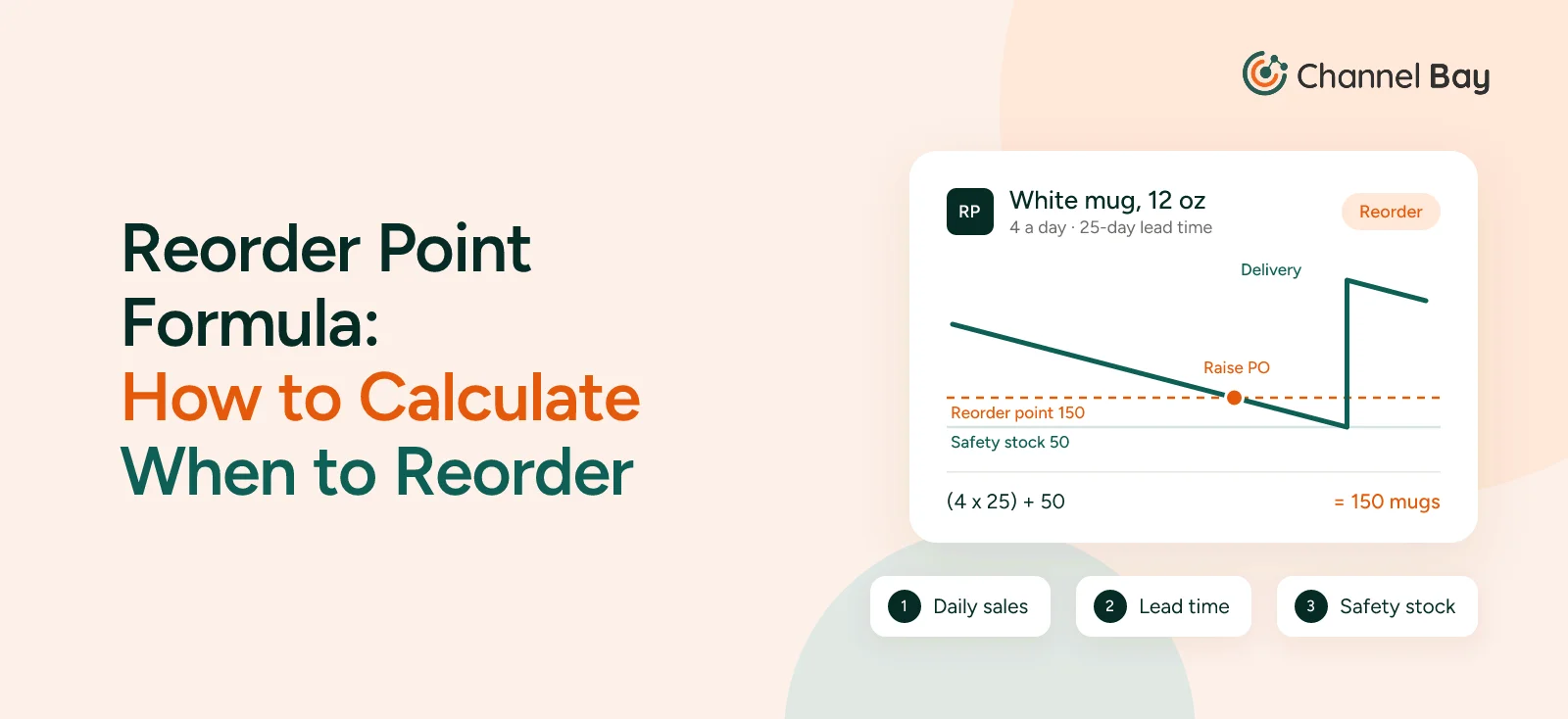
The example is the one used across our purchase order guides: a kitchenware brand selling white 12 oz mugs, SKU MUG-WHT-12.
Step 1: Work Out Average Daily Sales
The mug sold 240 units in the last 60 days and was in stock the whole time.
240 / 60 = 4 mugs a day
Step 2: Measure the Lead Time
The last three purchase orders for the mug took 24, 25 and 26 days from the day the PO was sent to the day the mugs were received and on the shelf.
Average lead time = 25 days
Step 3: Calculate the Reorder Point Without Safety Stock
4 mugs a day x 25 days = 100 mugs
This is the lead time demand. If the brand orders at 100, it expects to sell exactly 100 mugs before the delivery lands, so the delivery arrives as the last mug sells. That only works if every day is an average day and the supplier is never late. A single busy week or a delayed container means a stockout.
Step 4: Add Safety Stock
The simplest way to size safety stock is to compare a bad case with the average case:
Safety stock = (highest daily sales x longest lead time) − (average daily sales x average lead time)
The mug's busiest recent stretch averaged 5 a day, and its slowest delivery took 30 days:
(5 x 30) − (4 x 25) = 150 − 100 = 50 mugs
Reorder point = 100 + 50 = 150 mugs
If sales and lead time run to average, the next delivery arrives with 50 mugs still on the shelf. If both run to their recent worst, it arrives as the last one sells. This method is a quick starting point. Statistical methods that size safety stock to a target service level are a topic of their own.
| Lead time demand | Safety stock | Reorder point | |
|---|---|---|---|
| Without safety stock | 4 x 25 = 100 | 0 | 100 |
| With safety stock | 4 x 25 = 100 | 50 | 150 |
What Happens If You Order Late
In our purchase order guide, the brand only notices when the mugs are down to 80, already below the reorder point of 150. At 4 a day, 80 mugs last 20 days. The supplier needs 25. Even at an average pace, the mugs are out of stock for about 5 days before the delivery arrives, which is around 20 lost sales.
What Changes the Reorder Point
A reorder point is only as good as the numbers that went into it.
Seasonal or Growing Sales
Use the sales rate you expect while you wait for the delivery, not the average of a period that's already over. Suppose the mug sells twice as fast in the gift season, 8 a day instead of 4:
(8 x 25) + 50 = 250 mugs
Holding the reorder point at 150 into the season leaves 150 mugs to cover a 25-day wait, at a rate that sells 200. The new reorder point has to be in place at least one lead time before the season starts, or the first order of the season goes out too late. The safety stock usually needs to grow with the sales rate too; the 50 here is kept the same to keep the example simple.
The same applies to a product that's growing steadily: base the rate on the most recent weeks rather than the last six months. The reverse is just as common. A promotion that doubled sales for one week shouldn't lift the reorder point for the next quarter, so leave one-off spikes out of the average.
Lead Times That Change
If the supplier closes for a holiday or a shipping route slows down, the lead time goes up and the reorder point with it. At a 40-day lead time, the mug's reorder point is (4 x 40) + 50 = 210, again holding safety stock at 50 for simplicity. Recheck the lead time against your most recent POs every few months, because suppliers rarely tell you they've got slower.
Stock Already on Open Purchase Orders
Compare the reorder point with the stock you have plus the stock you've ordered, not with shelf stock alone. Inventory planners call this the inventory position:
Inventory position = stock on hand + stock on open POs − units sold but not yet shipped
When the brand raised PO-2026-0142 for 500 mugs, it had 80 on hand. A week later, with about 52 left on the shelf, the inventory position is 52 + 500 = 552. That's well above 150, so there's nothing to reorder. Checking shelf stock alone would show 52, below the reorder point, and the brand would order the same mugs twice.
The opposite mistake is an open PO balance that's never going to ship. If you received 480 of 500 and the last 20 are never coming, those 20 still count as stock on order until you close the balance. See what to do with short deliveries and backorders for when to keep a balance open and when to cancel it.
A Supplier's Minimum Order
A supplier's minimum order quantity doesn't change the reorder point. It changes how much you order once you reach it, and so how often you reach it.
One common way to size an order is to cover the lead time plus a set number of days of sales, then take off what you have and what's already coming. Ordering on time at the reorder point, to cover the next 60 days after delivery:
4 x (25 + 60) − 150 on hand − 0 on order = 190 mugs
The 190, plus the 50 still on the shelf when the delivery lands, covers those 60 days. But the mug's supplier has a minimum of 500, packed in cartons of 20, so the order goes up to 500. At 4 a day, an order of 190 sells through in about 48 days and an order of 500 in about 125, so the brand reorders roughly every four months instead of every seven weeks, with more cash tied up in stock between orders. The reorder point stays at 150 either way.
Reorder Points in Shopify
Shopify's Help Center doesn't describe a reorder point setting or calculation. What it does offer:
- Days of inventory remaining report: Each variant's ending stock divided by its average daily sales over the last 28 days (Shopify Help Center, inventory reports). It tells you how long stock will last, but not how that compares with your supplier's lead time.
- Low stock notifications through Shopify Flow: Flow has a template, "Get notified by email when product variant inventory is low", built on the "Product variant inventory quantity changed" trigger. To check stock at one location rather than in total, the workflow has to use that location's available quantity (Shopify Help Center, Flow trigger). See how low stock alerts differ from reorder point alerts.
- Purchase orders: Shopify's purchase order docs cover suppliers, costs, payment terms and receiving, but not reorder points or suggested quantities (Shopify Help Center, purchase orders).
So with Shopify alone, the reorder point itself comes from a spreadsheet, and you recalculate it by hand when sales or lead times change. When stock gets there, you check what's already on order and create the purchase order in Shopify yourself.
How Channel Bay Tells You When to Reorder
Channel Bay compares days of stock left with the lead time from your purchase orders, instead of asking you for a safety stock figure, and shows the working on every product:
- Days left and days to reorder: Units sold per day comes from your Shopify orders (Amazon sales aren't included in the forecast yet). Days left is stock on hand divided by sells per day, and days to reorder is days left minus lead time. When days to reorder goes negative, you're already late.
- Lead time from your own POs: Channel Bay measures the time from ordering to receiving on your purchase orders, and uses 14 days until there's enough history.
- A status that warns early: Healthy stock level, Monitor stock when days left fall within the lead time plus 20%, or Stockout risk when you're late. The 20% is a built-in buffer: it raises the alarm before stock reaches lead time demand.
- A suggested quantity that counts open POs: The suggestion is sells per day x (lead time + 60) − on hand − incoming on open POs, so stock already on its way comes off. Pack sizes and minimum order quantities are applied when you build the PO, and the Forecast tab has a Create PO button.
- Your own reorder points, too: You can set a reorder point on any variant. The dashboard lists variants whose available stock is below their reorder point, grouped by supplier, with a suggested quantity rounded up to whole packs and at least the supplier's minimum.
Days left and the status use the stock you have on hand, so a product with a PO already on the way can still show Stockout risk until the delivery arrives. The suggested quantity is the number that counts that PO, so check it before ordering more.
For the mug, 80 on hand at 4 a day is 20 days left against a 25-day lead time: 5 days late, so it shows Stockout risk. Monitor stock would have appeared at 30 days left, or 120 mugs, while there was still time to order. That's a buffer of 20 mugs, against the 50 of safety stock worked out above. To keep the full 50, set the mug's reorder point to 150, and it joins the dashboard's reorder list when stock falls below it. The suggested quantity at 80 on hand is 4 x (25 + 60) − 80 − 0 = 260, which goes up to the supplier's minimum of 500 on the PO.
See how Channel Bay forecasts what to reorder and when, or read the full purchase order process, from raising the order to closing it.
Frequently Asked Questions
What is the reorder point formula?
What is the difference between a reorder point and safety stock?
Is a reorder point the same as a reorder level?
How often should you recalculate a reorder point?
Does Shopify calculate reorder points?

Guides from the team that builds and supports Channel Bay, the Shopify inventory app for purchase orders, stocktakes, stock transfers and multichannel stock sync. About Channel Bay