Minimum Order Quantity (MOQ): How to Plan and Negotiate Around It
Minimum order quantity (MOQ) is the least a supplier will sell you. See what it costs in cash and landed cost, how to negotiate it and how to track it.
On this page
Key Takeaways
- A minimum order quantity (MOQ) is the smallest quantity a supplier will sell in one order. It can apply to each product, to the whole order or to the order's value, so ask which one your supplier means.
- Your reorder quantity and the MOQ are different numbers. You order the larger of the two, rounded up to whole cartons. When the MOQ wins, it decides how long the stock lasts and how much cash it ties up.
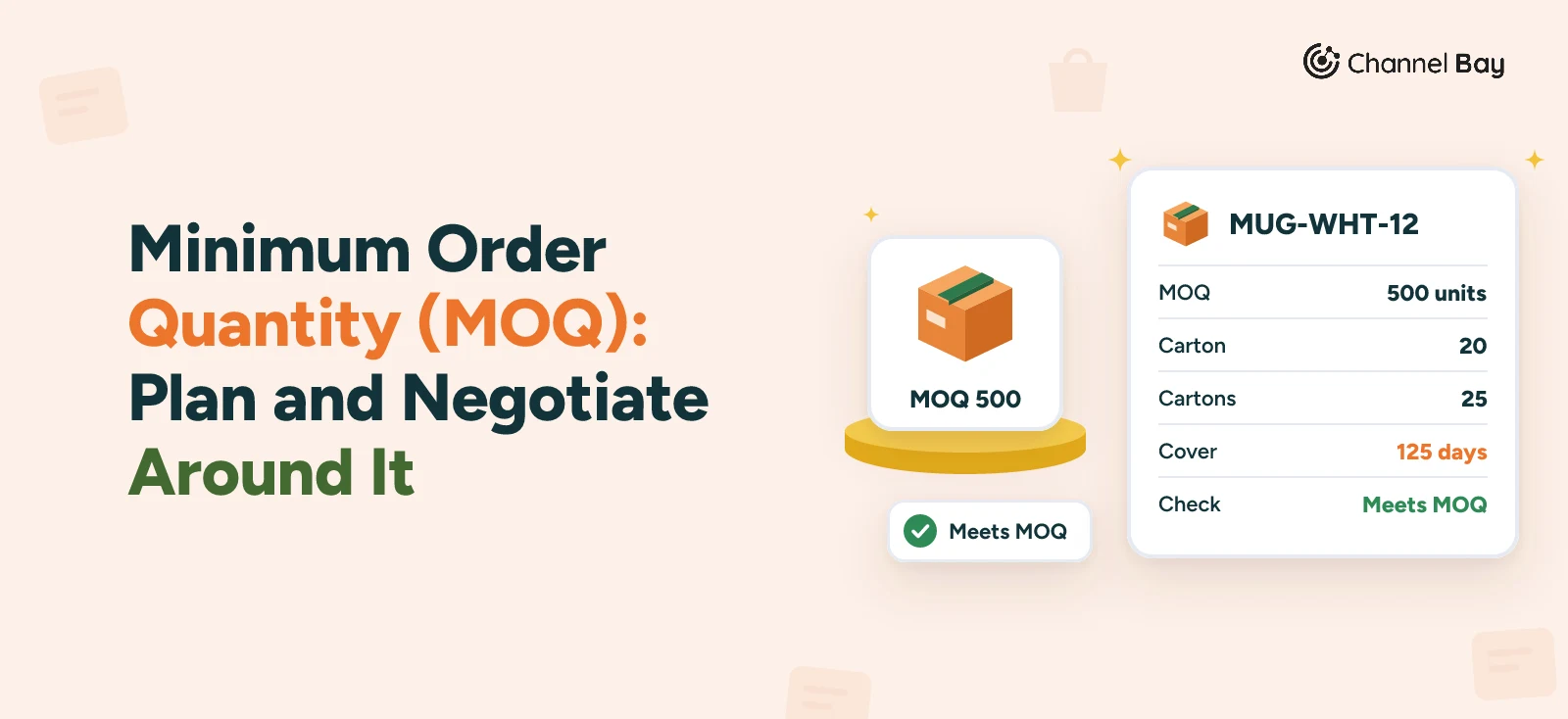
- Judge a minimum by its cover: MOQ divided by daily sales. In the mug example a 500 unit minimum is 125 days of stock where the plan called for 190 units, about 48 days.
- Shopify's purchase order and supplier pages describe no minimum field. Shopify B2B quantity rules are a different thing: they limit what your customers can buy from you.
- Channel Bay stores an MOQ in units for each product and supplier, starts PO lines and suggestions at it and refuses to save a PO below it. It has no minimum order value and no override on the order.
A minimum order quantity (MOQ) is the smallest quantity a supplier will sell you in one order. It shows up on quotes as "MOQ 500" or "minimum 12 cartons", and it is the number that turns a sensible reorder into a larger purchase than you wanted.
Most explanations stop at the definition. This guide goes on to what a minimum costs in cash and in landed cost per unit, how to decide whether to accept it or negotiate, how it fits with pack size and the quantity you calculated, and what Shopify and Channel Bay do about it. It is a companion to the reorder point guide, which says when to order, and to the purchase order guide, where the minimum is agreed before the PO goes out.
What Is a Minimum Order Quantity (MOQ)?
The minimum order quantity is a supplier term. The supplier decides it, usually to cover the set-up, production run, packing and freight that go into any order, and states it in a quote or price list. It is not something you calculate. What you calculate is what it does to your purchasing.
A supplier's minimum can be counted three ways, and a quote often says only "MOQ".
| Kind of minimum | Example | Counted in |
|---|---|---|
| Per product or variant | 500 of MUG-WHT-12 | Units of that product |
| Per order | 1,000 units, any mix of products | Units on the whole order |
| Order value | $1,500 per order | Money |
Ask which one applies, and whether a mix of products or variants adds up toward it. A per-product minimum of 500 means 500 white mugs, not 250 white and 250 blue, unless the supplier says otherwise.
For an online store the minimum matters most at the point of reordering. The reorder point tells you when stock is low. The minimum tells you how much you have to buy once you get there.
What a Minimum Order Quantity Costs You
The mug example used across our purchase order guides shows it. The brand sells about 4 white mugs a day (MUG-WHT-12) and reorders at 150 on hand. Its supplier has a minimum of 500, packed 20 to a carton. The reorder point guide works out that to cover the 60 days after delivery, it needs 190 mugs. The supplier will not sell 190.
| What the plan called for | What the minimum forces | |
|---|---|---|
| Units on PO-2026-0142 | 190 | 500 |
| Cash at $3.20 a mug | $608 | $1,600 |
| Days of stock at 4 a day | about 48 | 125 |
The minimum puts 310 extra mugs on the shelf, which is $992 of cash tied up and 77 more days of stock. The brand reorders about every four months instead of every seven weeks. The reorder point stays at 150 either way. What changes is how much each order costs and how often you place one.
Minimums are not all downside. They also change the cost of each unit once freight is in. Suppose the PO carries $180 of freight. Over 500 mugs that adds $0.36 a mug, so each costs $3.56 with freight. If the same $180 would also move 190 mugs, which depends on weight, carrier and how the supplier charges, each would carry $0.95 of freight and cost $4.15 with freight. The landed cost guide shows how freight and fees are spread over a PO. Freight charged per shipment is the main reason a bigger order can lower the cost of each unit.
These figures are an example, not data from a real supplier. A real supplier may price a smaller order differently. The method carries over. Work out the days of cover:
Days of cover = MOQ ÷ units sold per day
Then set it against what you can hold. Cash, storage space, shelf life and the chance that the product stops selling all limit how many days of stock are sensible. If the cash is the limit on an order you have already won, see purchase order financing for what that costs and who it suits. If the cover is longer than that, the minimum is the problem to solve, not the reorder point.
How to Plan and Negotiate Around a Minimum
When a minimum is higher than you need, you have a handful of options. Which one fits depends on the product and on how much leverage you have.
- Accept it and plan for the cover. For a steady seller with a long shelf life, ordering the minimum and selling it down is often fine. Check the cover, then put the next reorder date in your calendar, because the minimum has moved it.
- Ask what the minimum counts. If it applies to the whole order, a mix of products or variants may reach it. If it is a value, a smaller quantity of a dearer product may do.
- Trade price for quantity. Some suppliers will sell below the minimum at a higher unit price. Ask for the price at the minimum and at the quantity you want, then compare the landed cost per unit and the cash tied up, not just the unit price.
- Offer a commitment for smaller releases. If you will buy the same product all year, a blanket purchase order can trade a total quantity for a lower minimum on each delivery. See blanket purchase orders for an example on the mug.
- Ask for a first-order exception. A smaller first order to test a product is a common request, and it is easier to make before you have a track record than after.
- Share the order. Splitting an order with another store, or adding other products from the same supplier to one shipment, can share the minimum and the freight.
- Look elsewhere or drop the product. If the cover runs to a year or more and nothing else works, a second supplier or a different product may cost less than the stock sitting on the shelf.
Whatever you agree, get it in writing before you raise the PO. With a quote in hand, the PO only has to restate what has been agreed. That is step 2 of how to create a purchase order.
MOQ, Pack Size and Reorder Quantity
Three numbers decide how much goes on a PO line, and they are easy to mix up.
| Term | Counted in | Who decides | What it does |
|---|---|---|---|
| Reorder quantity | Units | You | How much you want, from sales, lead time and the days you want to cover |
| MOQ | Units, or money | The supplier | The smallest order the supplier accepts |
| Pack size (carton or case pack) | Units per carton | The supplier | You order in whole cartons |
The rule is to take the larger of your quantity and the minimum, then round up to whole cartons.
Order = the larger of (what you need, MOQ), rounded up to whole cartons
For the mugs, 190 needed against a minimum of 500 gives 500, which is 25 cartons of 20. As an illustration with other numbers, suppose you need 30 of a product with a minimum of 50 and cartons of 12. The larger is 50, and rounding up to whole cartons makes it 60, or 5 cartons.
Round after you compare, not before. Rounding 30 up to 36 and then taking the larger of 36 and 50 gives 50, which is not a whole number of cartons, so the supplier would have to split one.
The economic order quantity (EOQ) is a formula for the order size that balances the cost of ordering against the cost of holding stock. The basic formula has no supplier minimum in it, so when the EOQ comes out below the MOQ, the MOQ is the quantity you buy.
Minimum Order Quantity in Shopify
Shopify's help pages for purchase orders and suppliers describe no field for a minimum order quantity or a pack size. A purchase order line takes a quantity, an optional supplier SKU, and a cost and tax percentage. When you add a product, the supplier SKU, cost and tax can fill in from earlier purchase orders with that supplier, and the minimum is not among them. A supplier record holds contact and address cards and the lines you have ordered before (Shopify Help Center, purchase orders and suppliers, read 9 November 2026).
So in Shopify the minimum lives in the supplier's quote or your own spreadsheet, and nothing stops a PO from going out below it. The Stocky comparison covers the other supplier details Shopify leaves out.
The Other Minimum: Quantity Rules for Your Customers
If you searched for a minimum order quantity in Shopify, you may have meant the other direction: the least a customer can buy from you. Shopify B2B catalogs have quantity rules for that. For each product or variant, you can set an increment (selling in multiples of 10, say), a minimum, a maximum, or a mix of these. The rules apply to each variant, so a customer can't combine 5 gray hats and 5 blue hats to meet a minimum of 10 (Shopify Help Center, quantity rules and volume pricing, read 9 November 2026). The page recommends that your theme shows the minimum on the product page.
That is a rule on what you sell. It does nothing about what your supplier makes you buy. For the customer-side PO flow, see Shopify B2B purchase orders.
How Channel Bay Handles a Minimum Order Quantity
Channel Bay keeps the minimum on the supplier's product and uses it when you build a PO. This is what it does, as of November 2026:
- One minimum for each product and supplier. Every product linked to a supplier has its own MOQ, a whole number of 1 or more, beside the supplier SKU, unit cost and pack size. The same mug can have a minimum of 500 with one supplier and 100 with another. Set it in the supplier's Products tab, with Update Products, or in the CSV import, which has an MOQ column. A new supplier link starts at 1, so nothing is enforced until you enter the real minimum.
- Counted in units, apart from pack size. The MOQ is always a number of units. Pack size only applies to a supplier ticked as delivering in packs. For that supplier the PO's quantity column counts packs, and Channel Bay converts them to units.
- A new line starts at the minimum. When you add a product to a PO by hand, the line starts at the supplier's MOQ for that product, rounded up to whole cartons for a pack supplier. Adding a product that is already on the PO from the single-product search is refused. Selecting it again in the multi-select add raises the line by one carton, or one unit.
- Suggestions are raised to it. When you build a PO from a restock list or with the Add to purchase order button on the Forecast tab, the line starts from the room to the product's max level, or from its reorder point quantity if no max is set. If the supplier's minimum is higher, the line is raised to it, then rounded up to whole cartons. That can leave the quantity above your max level. When you start from a supplier group on the dashboard, the line takes the dashboard's Suggest quantity, which is the gap between available stock and the reorder point, raised to the minimum and rounded to cartons in the same way. The forecast's own suggested quantity is not rounded: minimums and pack sizes are applied when you build the PO.
- Saving below the minimum is refused. When you create a PO or save changes to it, Channel Bay adds up the units on every line for the same product and compares the total with that supplier's minimum. If it is short, the save fails with a message such as "Mug requires minimum order quantity of 500 units". With cartons of 20, 24 cartons is 480 units and is refused, and 25 cartons is accepted. The message names one product at a time, so a PO with several short lines may need several attempts.
- Nothing else re-checks it. Receiving does not test the received quantity against the minimum, so a short delivery is recorded as it arrived. See goods receipt for short deliveries and backorders.
- Where you see it. The supplier's product table has an MOQ column, the PO's selected products cart has an optional MOQ column that is hidden until you add it from Columns, and the Supplier Catalogue report lists each variant's minimum order beside its cost, pack size and lead time.
Some limits to know about:
- Per product only. There is no minimum for a whole order, for a mix of products or for an order value. If your supplier sets one, keep it in your notes and check the PO total yourself.
- No override on the order. The check is a hard stop. If a supplier agrees to a smaller order this once, you have to lower the MOQ on that supplier's product before you can save the PO, and put the real minimum back afterwards.
- One cost per product and supplier. The unit cost is a single number, so a price that drops at a quantity break is not stored. Enter the price you are quoted for the quantity you are ordering.
Suppliers and purchase orders follow the Purchase Orders module, which is on every plan including Free, so check the pricing page for the plan you are on. The Add to purchase order button needs the plan that includes forecasting, such as Pro. The purchase orders page shows where the minimum fits with the rest of the order.
Common Minimum Order Quantity Mistakes
- Treating the minimum as the reorder quantity. Ordering the minimum every time without checking the cover can leave you with months of stock you didn't need, while the cash for the next product is gone.
- Not asking what the minimum counts. A per-order minimum and a per-product minimum plan very differently. Ask before you build the PO, not after.
- Leaving the minimum off the supplier record. In a sheet it gets forgotten. In Channel Bay it stays at 1 until you change it, so nothing warns you.
- Forgetting cartons. A minimum that is not a whole number of cartons has to round up. Order 480 against a minimum of 500 in cartons of 20 and you are 20 units short.
- Forgetting freight changes with order size. A smaller or larger order moves the freight on each unit, so compare landed costs, not unit prices.
- Never checking it again. Suppliers change minimums with their prices. Check the minimum whenever a new quote arrives.
Where to Start
Take your five best sellers and write down for each the supplier's minimum, the carton size and the units sold a day. Divide the minimum by the daily sales. Any product whose cover is longer than you can comfortably hold is worth a conversation with the supplier before the next order. Then enter the real minimums against each supplier's products, so the PO stops short of an order the supplier will refuse.
Frequently Asked Questions
What does MOQ mean?
How do you calculate MOQ?
Is MOQ per product or per order?
Can you negotiate a minimum order quantity?
What is the difference between MOQ and pack size?
Does Shopify have a minimum order quantity setting?

Guides from the team that builds and supports Channel Bay, the Shopify inventory app for purchase orders, stocktakes, stock transfers and multichannel stock sync. About Channel Bay